Page 3 of 3 FirstFirst 123
Results 21 to 30 of 30

Thread: Tests and Notes for EMail Threads

Hybrid View

Previous Post Previous Post   Next Post Next Post
  1. #1
    Fuhrer, Vierte Reich DocAElstein's Avatar
    Join Date
    Aug 2014
    Posts
    10,457
    Rep Power
    10
    …continued … In support of this forum post
    https://eileenslounge.com/viewtopic.php?f=27&t=38916


    Here is the story so far
    We have done _Part_1) , enabled (Turned on) 2 step verification on the gmail account

    We now need to do _Part2) generate / create an "Apps password"


    _Part2) generate / create an "Apps password"

    The start point is getting logged into the gmail account that you want to use in the CDO send Mail coding. ( see sections _1) and _2) from the previous post https://excelfox.com/forum/showthrea...ll=1#post19038
    https://excelfox.com/forum/showthrea...age3#post19038
    )

    Go to App passwords ( Note it shows None, because we have not got any yet )
    Click on the file >
    https://i.postimg.cc/t4LsFjJm/Go-to-...n-the-file.jpg

    As ever, we will be asked to verify https://i.postimg.cc/jSWWW5x7/verify-again.jpg , and I usually choose to get an SMS on my mobile phone
    https://i.postimg.cc/BQ7LQD03/verify...bile-phone.jpg
    https://i.postimg.cc/g2rhvsDr/verify...bile-phone.jpg
    https://i.postimg.cc/sfcGqqHv/verify...bile-phone.jpg

    We now need to make some selections
    https://i.postimg.cc/pr2hyJrW/We-now...selections.jpg
    I chose Mail and Windows Computer – that was a bit of a guess on my behalf. I am using CDO mail send coding on my LapTop.
    https://i.postimg.cc/nr0sm99v/make-s...tions-Mail.jpg
    https://i.postimg.cc/j56nsFs3/make-s...s-Computer.jpg

    I create ( generate )
    https://i.postimg.cc/B6f1f0G1/I-create-Generate.jpg

    I have a 16 character code Generated for me
    https://i.postimg.cc/KYMgWYC2/I-have...-Generated.jpg
    Note: It is probably advisable to copy this and keep it stored safely somewhere for future reference.
    It should be a 16 character text string, probably looking something like this
    nvutkxjfkxyzdbwo


    That’s it. That is the so called apps password
    https://i.postimg.cc/nh5DTmR2/Thats-it-finished.jpg


    We are now ready to use this newly created (Generated) app password in a CDO send mail coding


    In the next post, Part3, we will use this newly created (Generated) app password in a CDO send mail coding
    Last edited by DocAElstein; 03-20-2023 at 11:38 PM.

  2. #2
    Fuhrer, Vierte Reich DocAElstein's Avatar
    Join Date
    Aug 2014
    Posts
    10,457
    Rep Power
    10
    …continued … In support of this forum post
    https://eileenslounge.com/viewtopic.php?f=27&t=38916


    Here is the story so far
    We have done _Part_1) , enabled (Turned on) 2 step verification on the gmail account
    and
    _Part2) generate / create an "Apps password"

    This next part, Part3, we will use this newly created (Generated) app password in a CDO send mail coding


    Part 3) Using a gmail "Apps password" in a CDO send mail coding


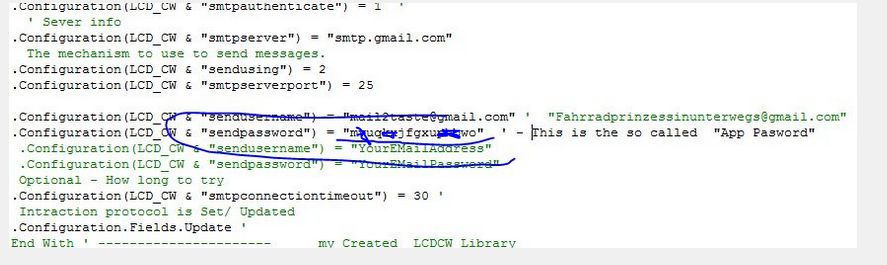
    We have already done the hard work. Now all we have to do is go to any CDO send mail coding that had previously worked using the normal password, and now replace that password with our newly created Apps Password
    https://i.postimg.cc/c1XvvtnF/The-se...p-Password.jpg The sendpassword should be the App Password.JPG


    If we now run that coding, we should now have success.
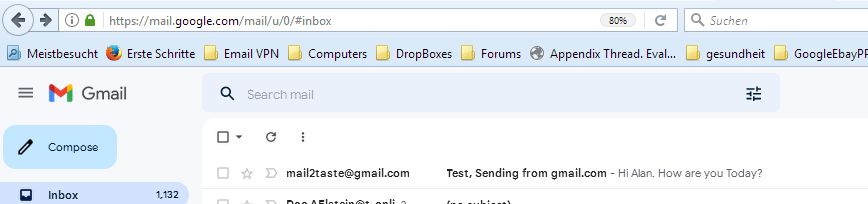
    In that example coding, I was attempting to send an Email to my Google freemail gmail.com account and my German Telekom freemail t-online.de account,
    https://i.postimg.cc/0yJjXtH4/Sendin...m-accounts.jpg Sending on my gmail and telekom accounts.JPG


    and, Bingo! – it worked:

    https://i.postimg.cc/d1wbd1yB/Arrive...m-freemail.jpg
    https://i.postimg.cc/Dzkkv5fR/Arrived-at-my-gmail.jpg

    Arrived at my German Telekom freemail.JPGArrived at my gmail.JPG


    Ref
    https://stackoverflow.com/questions/...dditional-info
    https://eileenslounge.com/viewtopic....300925#p300925

    Last edited by DocAElstein; 03-20-2023 at 11:39 PM.

  3. #3
    Fuhrer, Vierte Reich DocAElstein's Avatar
    Join Date
    Aug 2014
    Posts
    10,457
    Rep Power
    10
    Last edited by DocAElstein; 11-17-2022 at 02:38 PM.
    ….If you are my competitor, I will try all I can to beat you. But if I do, I will not belittle you. I will Salute you, because without you, I am nothing.
    If you are my enemy, we will try to kick the fucking shit out of you…..
    Winston Churchill, 1939
    Save your Forum..._
    KILL A MODERATOR!!

  4. #4
    Fuhrer, Vierte Reich DocAElstein's Avatar
    Join Date
    Aug 2014
    Posts
    10,457
    Rep Power
    10
    …continued … In support of this forum post
    https://eileenslounge.com/viewtopic.php?f=27&t=38916


    https://www.youtube.com/channel/UCnxwq2aGJRbjOo_MO54oaHA
    https://eileenslounge.com/viewtopic.php?p=316441#p316441
    https://eileenslounge.com/viewtopic.php?p=324736#p324736
    https://eileenslounge.com/viewtopic.php?p=324990#p324990
    https://eileenslounge.com/viewtopic.php?f=27&t=41937&p=325485#p325485
    https://eileenslounge.com/viewtopic.php?p=325609#p325609
    https://eileenslounge.com/viewtopic.php?p=325610#p325610
    https://www.youtube.com/watch?v=3t8Mk4URi6g&lc=UgzoakhRXOsCaoRm_Nd4AaABAg.8xzeMdC8IOGADdPM65i9 PG
    https://www.youtube.com/watch?v=3t8Mk4URi6g&lc=UgzoakhRXOsCaoRm_Nd4AaABAg.8xzeMdC8IOGADdPQHFk_ zm
    http://www.eileenslounge.com/viewtopic.php?p=324457#p324457
    http://www.eileenslounge.com/viewtopic.php?p=324064#p324064
    http://www.eileenslounge.com/viewtopic.php?p=323960#p323960
    https://www.youtube.com/watch?v=7VwD9KuyMk4&lc=UgyZCnNfnZRfgwzDlQF4AaABAg
    https://www.youtube.com/watch?v=7VwD9KuyMk4&lc=UgyZCnNfnZRfgwzDlQF4AaABAg.ADd4m2zp_xDADd6Nnotj 1C
    s://www.youtube.com/watch?v=7VwD9KuyMk4&lc=UgySdtXqcaA27wQLd1t4AaABAg
    http://www.eileenslounge.com/viewtopic.php?p=323959#p323959
    http://www.eileenslounge.com/viewtopic.php?f=30&t=41784
    http://www.eileenslounge.com/viewtopic.php?p=323966#p323966
    http://www.eileenslounge.com/viewtopic.php?p=323959#p323959
    http://www.eileenslounge.com/viewtopic.php?p=323960#p323960
    http://www.eileenslounge.com/viewtopic.php?p=323894#p323894
    http://www.eileenslounge.com/viewtopic.php?p=323843#p323843
    https://www.youtube.com/watch?v=fEHKPhJxgBA&lc=Ugxx8_MjhC9FDaQgcHN4AaABAg
    https://www.youtube.com/watch?v=jpjYm4UvyWk&lc=Ugx_Qd4rfAN_ZYcJbo94AaABAg.ACGbG9c76OWACGbjKa7H 8k
    https://www.youtube.com/watch?v=jpjYm4UvyWk&lc=Ugx_Qd4rfAN_ZYcJbo94AaABAg
    https://www.youtube.com/watch?v=GyPHaydeng0&lc=UgzE4a4f_e_y9Rk5OR94AaABAg
    https://www.youtube.com/watch?v=I5FkNG94BcQ&lc=UgxXnkEHqulXSR5tXwh4AaABAg
    https://www.youtube.com/watch?v=3t8Mk4URi6g&lc=UgzoakhRXOsCaoRm_Nd4AaABAg.8xzeMdC8IOGABa6BSa17 3Z
    https://www.youtube.com/watch?v=3t8Mk4URi6g&lc=UgzoakhRXOsCaoRm_Nd4AaABAg.8xzeMdC8IOGABa6-64Xpgl
    https://www.youtube.com/watch?v=3t8Mk4URi6g&lc=UgzoakhRXOsCaoRm_Nd4AaABAg.8xzeMdC8IOGABa5ms39y jd
    https://www.youtube.com/watch?v=3t8Mk4URi6g&lc=UgzoakhRXOsCaoRm_Nd4AaABAg.8xzeMdC8IOGABa5ZXJwR CM
    https://www.youtube.com/watch?v=3t8Mk4URi6g&lc=UgzoakhRXOsCaoRm_Nd4AaABAg.8xzeMdC8IOGABa4Pr15N Ut
    https://www.youtube.com/watch?v=3t8Mk4URi6g&lc=UgzoakhRXOsCaoRm_Nd4AaABAg.8xzeMdC8IOGABa4I83Je lY
    https://www.youtube.com/watch?v=3t8Mk4URi6g&lc=UgzoakhRXOsCaoRm_Nd4AaABAg.8xzeMdC8IOGADdMo2n-hyF
    https://www.youtube.com/channel/UCnxwq2aGJRbjOo_MO54oaHA
    Last edited by DocAElstein; 03-25-2025 at 02:25 AM.
    ….If you are my competitor, I will try all I can to beat you. But if I do, I will not belittle you. I will Salute you, because without you, I am nothing.
    If you are my enemy, we will try to kick the fucking shit out of you…..
    Winston Churchill, 1939
    Save your Forum..._
    KILL A MODERATOR!!

  5. #5
    Fuhrer, Vierte Reich DocAElstein's Avatar
    Join Date
    Aug 2014
    Posts
    10,457
    Rep Power
    10
    Last edited by DocAElstein; 11-17-2022 at 01:14 PM.
    ….If you are my competitor, I will try all I can to beat you. But if I do, I will not belittle you. I will Salute you, because without you, I am nothing.
    If you are my enemy, we will try to kick the fucking shit out of you…..
    Winston Churchill, 1939
    Save your Forum..._
    KILL A MODERATOR!!

  6. #6
    Fuhrer, Vierte Reich DocAElstein's Avatar
    Join Date
    Aug 2014
    Posts
    10,457
    Rep Power
    10
    Last edited by DocAElstein; 11-17-2022 at 01:14 PM.
    ….If you are my competitor, I will try all I can to beat you. But if I do, I will not belittle you. I will Salute you, because without you, I am nothing.
    If you are my enemy, we will try to kick the fucking shit out of you…..
    Winston Churchill, 1939
    Save your Forum..._
    KILL A MODERATOR!!

  7. #7
    Fuhrer, Vierte Reich DocAElstein's Avatar
    Join Date
    Aug 2014
    Posts
    10,457
    Rep Power
    10

    VBA to automate Send and Automatically Sending of E-Mai

    _1 ) Way 1) Use the CDO (Collaboration Data Objects ) object library available in VBA
    Main Code , Sub PetrasDailyProWay1_COM_Way() ,
    and
    Function Code for solution to this Thread and Post
    http://www.excelfox.com/forum/showth...kbooks-at-once
    http://www.excelfox.com/forum/showth...0518#post10518


    Code:
    Option Explicit ' Daily Diet plan, Sending of Notes and an Excel File
    Sub PetrasDailyProWay1_COM_Way() '  Allow access to deep down cods wollops from Microsoft to collaborating in particular in the form of messaging. An available library of ddl library functions and associated things is available on request, the  Microsoft CDO for Windows 2000. We require some of these '  CDO is an object library that exposes the interfaces of the Messaging Application Programming Interface (MAPI). API: interfaces that are fairly easy to use from a fairly higher level from within a higher level programming language. In other words this allows you to get at and use some of the stuff to do with the COM OLE Bollocks from within a programming language such as VBA  API is often referring loosely to do with using certain shipped with Windows software in Folders often having the extension dll. This extension , or rather the dll stands for direct link libraries. These are special sort of executable files of functions shared by many other (Windows based usually) software’s.
    ' Rem1 The deep down fundamental stuff , which includes stuff been there the longest goes by the name of Component Object Model. Stuff which is often, but not always, later stuff, or at a slightly higher level of the computer workings, or slightly more to a specific application ( an actual running "runtime" usage / at an instance in time , "instance of" ) orientated goes to the name of Object Linking and Embedding. At this lower level, there are protocols for communicating between things, and things relate are grouped into the  to Office  application available Library, CDO. An important object there goes by the name of Message.
    'Rem 1) Library made available            ====================#
      With CreateObject("CDO.Message") '   Folders mostly but not always are in some way referenced using dll, either as noted with the extension or maybe refered to as dll Files or dll API files.
    'Rem 2 ' Intraction protocols are given requird infomation and then set
        '2a) 'With --------------------* my Created LCDCW Library, (LCD 1.0 Library ) (Linking Configuration Data_Cods Wollups) which are used and items configured for the Exchange at Microsoft’s protocol thereof;   http://schemas.microsoft.com/cdo/configuration/ ......This section provides the configuration information for the remote SMTP server
        Dim LCD_CW As String: Let LCD_CW = "http://schemas.microsoft.com/cdo/configuration/" ' Linking Configuration Data : defines the majority of fields used to set configurations for various Linking Collaboration (LCD) Objects Cods Wollops: These configuration fields are set using an implementation of the IConfiguration.Fields collection.  https://msdn.microsoft.com/en-us/library/ms872853(v=exchg.65).aspx
         .Configuration(LCD_CW & "smtpusessl") = True ' ' ' HTTPS (Hyper Text Transfer Protocol Secure) appears in the URL when a website is secured by an SSL certificate. The details of the certificate, including the issuing authority and the corporate name of the website owner, can be viewed by clicking on the lock symbol on the browser bar. in short, it's the standard technology for keeping an internet connection secure and safeguarding any sensitive data that is being sent between two systems, preventing criminals from reading and modifying any information transferred, including potential personal details.  ' SSL protocol has always been used to encrypt and secure transmitted data
         .Configuration(LCD_CW & "smtpauthenticate") = 1  ' ... possibly this also needed ..   When you also get the Authentication Required Error you can add this three lines.
        '  ' Sever info
         .Configuration(LCD_CW & "smtpserver") = "smtp.gmail.com" ' "securesmtp.t-online.de"                 '"smtp.gmail.com" "smtp.mail.yahoo.com" "smtp.live.com" "pod51017.outlook.com"  "smtp-mail.outlook.com" "smtp.live.com"  "securesmtp.t-online.de"  465         SMTP is just used to mean the common stuff.....  Simple Mail Transport Protocol (SMTP) server is used to send outgoing e-mails. The SMTP server receives emails from your Mail program and sends them over the Internet to their destination.
        '  The mechanism to use to send messages.
         .Configuration(LCD_CW & "sendusing") = 2  '  Based on the LCD_OLE Data Base of type DBTYPE_I4
         .Configuration(LCD_CW & "smtpserverport") = 25 ' 465or25fort-online ' 465 'or 587 'or 25   ' The port of type somehow refered to by the last line
        '
         .Configuration(LCD_CW & "sendusername") = "excelvbaexp@gmail.com" ' "Doc.AElstein@t-online.de" ' .... "server rejected your response".  AFAIK : This will happen if you haven't setup an account in Outlook Express or Windows Mail .... Runtime error '-2147220975 (800440211)': The message could not be sent to the SMTP server. The transport error code is 0x80040217. The server response is not available
         .Configuration(LCD_CW & "sendpassword") = "Bollocks" '              "Bollox"
        ' Optional - How long to try     ( End remote SMTP server configuration section )
         .Configuration(LCD_CW & "smtpconnectiontimeout") = 30 '    Or there Abouts ;) :)
        ' Intraction protocol is Set/ Updated
         .Configuration.Fields.Update ' 'Not all infomation is given, some will have defaults. - possibly this might be needed initially ..    .Configuration.Load -1 ' CDO Source Defaults
        'End With ' -------------------* my Created  LCDCW Library ( Linking Configuration Data Cods Wollups)  which are  used and items configured for the Exchange at Microsoft's protocol therof;
       '2b) ' Data to be sent
       '.To = "Doc.AElstein@t-online.de"
       .To = "excelvbaexp@gmail.com"
       .CC = ""
       .BCC = ""
       .from = """Alan"" "
       .Subject = "Bollox"
       '.TextBody = "Hi" & vbNewLine & vbNewLine & "Please find the Excel workbook attached."
       .HTMLBody = MyLengthyStreaming
       .AddAttachment "G:\ALERMK2014Marz2016\NeueBlancoAb27.01.2014\AbJan2016\Übersicht aktuell.xlsx" ' ' Full File path and name. File must be closed
     Rem 3 Do it
       .Send
     End With ' CreateObject("CDO.Message") (Rem 1 Library End =======#
    End Sub
    Public Function MyLengthyStreaming() As String
    Rem 1 Make a long string from a Microsoft Word doc
    '1(i) makes available the Library of stuff, objects, Methods etc.
    Dim Fso As Object: Set Fso = CreateObject("Scripting.FileSystemObject")
    '1(ii) makes the big File Object                       " Full path and file name of Word doc saved as .htm       "
    Dim FileObject As Object: Set FileObject = Fso.GetFile("G:\ALERMK2014Marz2016\NeueBlancoAb27.01.2014\AbJan2016\ProMessage.htm"): Debug.Print FileObject
    '1(iii) sets up the data  "stream highway"
    Dim Textreme As Object:  Set Textreme = FileObject.OpenAsTextStream(iomode:=1, Format:=-2)        '   reading only, Opens using system default            https://msdn.microsoft.com/en-us/library/aa265341(v=vs.60).aspx
    '1(iv) pulls in the data, in our case into a simple string variable
     Let MyLengthyStreaming = Textreme.ReadAll         '        Let MyLengthyStreaming = Replace(MyLengthyStreaming, "align=center x:publishsource=", "align=left x:publishsource=")
     Textreme.Close
     Set Textreme = Nothing
     Set Fso = Nothing
    Rem 2 possible additions to MyLengthyStreaming
    Last bit of Function ( must go here in the excelfox Test Sub Forum in HTML Tags as there are HTML Tags in the final text string string and this makes a mess in normal BB code tags, because in excelfox Test Forum HTML is activated ) :
    HTML Code:
    Rem 2
     Let MyLengthyStreaming = "<p><span style=""color: #ff00ff;"">Start=========== " & Format(Now(), "DD MMMM YYYY") & " " & Now() & " ------------------------------------</span></p>" & MyLengthyStreaming & "<p><span style=""color: #ff00ff;"">-- " & Format(Now(), "DD MMMM YYYY") & " " & Now() & " ==End, Sent from Doc.AElstein Mail ======</span></p>"
    End Function

    https://www.youtube.com/channel/UCnxwq2aGJRbjOo_MO54oaHA
    https://www.youtube.com/watch?v=2oT4qrHmDMY&lc=UgwviLabd7r_3KpP6wh4AaABAg.9h5lFRmix1R9h78GftO_ iE
    https://www.youtube.com/watch?v=2oT4qrHmDMY&lc=UgyG714V_k7odQMrTz14AaABAg.9h740K6COOA9h77HSGDH 4A
    https://www.youtube.com/watch?v=2oT4qrHmDMY&lc=UgyG714V_k7odQMrTz14AaABAg.9h740K6COOA9h76fafzc EJ
    https://www.youtube.com/watch?v=2oT4qrHmDMY&lc=UgyG714V_k7odQMrTz14AaABAg.9h740K6COOA9h759YIjl aG
    https://www.youtube.com/watch?v=2oT4qrHmDMY&lc=UgyG714V_k7odQMrTz14AaABAg.9h740K6COOA9h74pjGcb Eq
    https://www.youtube.com/watch?v=2oT4qrHmDMY&lc=UgyG714V_k7odQMrTz14AaABAg
    https://www.youtube.com/watch?v=2oT4qrHmDMY&lc=UgzJJUDVv2Mb6YGkPYh4AaABAg.9h5uPRbWIZl9h7165DZd jg
    https://www.youtube.com/channel/UCnxwq2aGJRbjOo_MO54oaHA
    Last edited by DocAElstein; 07-10-2023 at 07:23 PM.
    ….If you are my competitor, I will try all I can to beat you. But if I do, I will not belittle you. I will Salute you, because without you, I am nothing.
    If you are my enemy, we will try to kick the fucking shit out of you…..
    Winston Churchill, 1939
    Save your Forum..._
    KILL A MODERATOR!!

  8. #8
    Fuhrer, Vierte Reich DocAElstein's Avatar
    Join Date
    Aug 2014
    Posts
    10,457
    Rep Power
    10
    Function Code for solution to this Thread and Post
    http://www.excelfox.com/forum/showth...0518#post10518


    HTML For CDO.Message.HTMLBody in VBA Emails sending

    Linked in my Binding Function, MyLenghtyString LBF_MLS
    In support of this Thread:
    http://www.excelfox.com/forum/showth...kbooks-at-once

    HTM / HTML is a very typical electronic message language recognised by most software devices associated with Email and similar.
    In two ways considered in this Thread , http://www.excelfox.com/forum/showth...0512#post10512 , the main Message Text body to be sent in an Email can be supplied as a single HTML code string.

    One convenient way to supply this is with a simple Word.doc file which can simply saved with a htm file extension
    Word doc to htm.JPG : https://imgur.com/vhRE9CC

    By opening this with a simple text editor, the actual text along with much more htm code detail can be revealed
    LastBitOfProMessage htm.JPG : https://imgur.com/mT6l40I
    LastBitOfProMessage htm 2.JPG : https://imgur.com/s0U8419

    This is the actual text required to be given after the an Email data filling code line like:
    _ .HTMLBody =

    The actual file held anywhere will likely include all sorts of computery stuff in addition to that text.
    We can get at just the text in several ways.
    A typical way in VBA is to make use of one of a number of Object Orientated stuff held in the Visual Basic FileSystemObject Object. This is in turn part of the Bundle in the available to application programs (such as Excel VBA) Library, Microsoft Scripting Runtime

    The way this works is as follows.
    For a given file, a large object can be made within the Microsoft Scripting Runtime Library Class type Module like Library, ** Polymorphically speaking.
    The Microsoft Scripting Runtime FileSystemObject Object GetFile method returns this object requiring only its full file path in order to “Get at it” . ( The returned object is pseudo in the streaming runtime instant direct compiling linking .Net technology held as a running link, ( indeed by assigning the object to, or using in an environment of, String will itself return that arguments string reference ) )
    **:From Microsoft documentation: Visual Basic provides polymorphism through multiple ActiveX interfaces. In the Component Object Model (COM) that forms the infrastructure of the ActiveX specification, multiple interfaces allow systems of software components to evolve and break existing code.
    In this sense interface is a set of related properties and methods. Much of the ActiveX specification is concerned with implementing standard interfaces to obtain system services or to provide malfunctionality to other programs.
    The actual processes involved are in the meantime so messed up that it is a wonder that anything still works, and I doubt it will be long before nothing does.
    The large FileObject in the Microsoft Scripting Runtime Library Class type Module like Library has information , amongst other things of neighbouring things , and as is typical in this mixed up messed up process , a short tem path or highway is made, and more often than not a “text stream object”, something like a continuous stream of data or like a highways going around in circles, and this will only be of a runtime existence, or at any rate should.. during this lifetime it can be “read”. I guess for any file of any type data within it will be recognised as such and can be handled in this simple text stream way.

    The original coding goes quite a way back and does not really fit in Object Orientated Visual basic hierarchical structure of the original implementation of File I/O in Visual Basic. But it does at lest work well in getting at text stream string things which we are interested in

    The available methods and the such reflect all the above…
    -…So code will have a string getting section that..
    1(i) makes available the Library of stuff, objects, Methods etc.
    1(ii) makes the big File Object
    1(iii) sets up the data “stream highway”
    1(iv) pulls in the data, in our case into a simple string variable


    _.____
    I have decided for my requirement to use a “Function” for this, not just to house tidily the above steps, but also as I may add some additional bits from time to time too the main inner body string for my Email message, which the main function of this all is to produce.
    To recap on the Function idea here ( http://www.excelfox.com/forum/showth...blem#post10503 )

    In end effect I want a String. In fact in the main code in which this should be embedded has this as a variable
    Pseudo, Linked in my Binding Function, ObjectLinkedEbeded Stuff
    In place of an actual static linked variable_...
    Dim MyLenghtyString As String
    _ Let MyLenghtyString = “static linked at pseudo Compile String”

    _.. I have
    Function MyLenghyString(Export) As String
    _ Pall MyLenghyString()_Import
    _.. or Let MyLenghtyString = “direct linked runny runable library”


    The end result is that in my code I will have simply pulling of

    _ .HTMLBody = MyLengthyStreaming


    Function Code description:
    Rem 1
    This uses the File System Object way discussed above to finally produce a long text string in variable _ MyLengthyStreaming _ This string probably has a of unnecessary stuff as well as the required part of the HTML code, but appears to be able to be handled and manipulated as if it were just the required part. Presumably the rest is ignored by things such as internet browsers

    Rem 2
    This allows for some extra simple string data to be added. If you are not familiar with HTML code then you can easily get the required string from text to HTML converters of which there are many freely available in internet
    Note: If you have any in your required HTML string, then you will need to replace them in the given string in the VBA code with “”
    http://www.excelfox.com/forum/showth...rmat#post10448


    ' https://support.microsoft.com/en-in/kb/186118
    https://www.youtube.com/watch?v=nj8mU3ecwsM
    https://www.youtube.com/watch?v=f8s-jY9y220&t=1813s


    Note: ' path in code must be changed to reflect where you save .htm file
    Pubic Function MyLengthyStreaming() As String
    Code:
    Public Function MyLengthyStreaming() As String
    Rem 1 Make a long string from a Microsoft Word doc
    '1(i) makes available the Library of stuff, objects, Methods etc.
    Dim Fso As Object: Set Fso = CreateObject("Scripting.FileSystemObject")
    '1(ii) makes the big File Object                       " Full path and file name of Word doc saved as .htm       "
    Dim FileObject As Object: Set FileObject = Fso.GetFile("G:\ALERMK2014Marz2016\NeueBlancoAb27.01.2014\AbJan2016\ProMessage.htm"): Debug.Print FileObject  ' path in code must be changed to reflect where you save it
    '1(iii) sets up the data  "stream highway"
    Dim Textreme As Object:  Set Textreme = FileObject.OpenAsTextStream(iomode:=1, Format:=-2)        '   reading only, Opens using system default            https://msdn.microsoft.com/en-us/library/aa265341(v=vs.60).aspx
    '1(iv) pulls in the data, in our case into a simple string variable
     Let MyLengthyStreaming = Textreme.ReadAll         '        Let MyLengthyStreaming = Replace(MyLengthyStreaming, "align=center x:publishsource=", "align=left x:publishsource=")
     Textreme.Close
     Set Textreme = Nothing
     Set Fso = Nothing
    Rem 2 possible additions to MyLengthyStreaming
    HTML Code:
    Rem 2
     Let MyLengthyStreaming = "<p><span style=""color: #ff00ff;"">Start=========== " & Format(Now(), "DD MMMM YYYY") & " " & Now() & " ------------------------------------</span></p>" & MyLengthyStreaming & "<p><span style=""color: #ff00ff;"">-- " & Format(Now(), "DD MMMM YYYY") & " " & Now() & " ==End, Sent from Doc.AElstein Mail ======</span></p>"
    End Function


    MyLengthyStreaming = "<p><span style=""color: #ff00ff;"">Start=========== " & Format(Now(), "DD MMMM YYYY") & " " & Now() & " ------------------------------------</span></p>" & MyLengthyStreaming & "<p><span style=""color: #ff00ff;"">-- " & Format(Now(), "DD MMMM YYYY") & " " & Now() & " ==End, Sent from Doc.AElstein Mail ======</span></p>"
    MyLengthyStreaming = "[color=Black]<[/color]p[color=Black]>[/color][color=Black]<[/color]span style=""color: #ff00ff;""[color=Black]>[/color]Start=========== " & Format(Now(), "DD MMMM YYYY") & " " & Now() & " ------------------------------------[color=Black]<[/color]/span[color=Black]>[/color][color=Black]<[/color]/p[color=Black]>[/color]" & MyLengthyStreaming & "[color=Black]<[/color]p[color=Black]>[/color][color=Black]<[/color]span style=""color: #ff00ff;""[color=Black]>[/color]-- " & Format(Now(), "DD MMMM YYYY") & " " & Now() & " ==End, Sent from Doc.AElstein Mail ======[color=Black]<[/color]/span[color=Black]>[/color][color=Black]<[/color]/p[color=Black]>[/color]"

    Code:
    Public Function MyLengthyStreaming() As String
    Rem 1 Make a long string from a Microsoft Word doc
    '1(i) makes available the Library of stuff, objects, Methods etc.
    Dim Fso As Object: Set Fso = CreateObject("Scripting.FileSystemObject")
    '1(ii) makes the big File Object                       " Full path and file name of Word doc saved as .htm       "
    Dim FileObject As Object: Set FileObject = Fso.GetFile("G:\ALERMK2014Marz2016\NeueBlancoAb27.01.2014\AbJan2016\ProMessage.htm"): Debug.Print FileObject
    '1(iii) sets up the data  "stream highway"
    Dim Textreme As Object:  Set Textreme = FileObject.OpenAsTextStream(iomode:=1, Format:=-2)        '   reading only, Opens using system default            https://msdn.microsoft.com/en-us/library/aa265341(v=vs.60).aspx
    '1(iv) pulls in the data, in our case into a simple string variable
     Let MyLengthyStreaming = Textreme.ReadAll         '        Let MyLengthyStreaming = Replace(MyLengthyStreaming, "align=center x:publishsource=", "align=left x:publishsource=")
     Textreme.Close
     Set Textreme = Nothing
     Set Fso = Nothing
    Rem 2 possible additions to MyLengthyStreaming
     Let MyLengthyStreaming = "<p><span style=""color: #ff00ff;"">Start=========== " & Format(Now(), "DD MMMM YYYY") & " " & Now() & " ------------------------------------</span></p>" & MyLengthyStreaming & "<p><span style=""color: #ff00ff;"">-- " & Format(Now(), "DD MMMM YYYY") & " " & Now() & " ==End, Sent from Doc.AElstein Mail ======</span></p>"
    End Function

    Results Example:

    Used htm Word File.JPG : https://imgur.com/mwihFBT
    "ProMessage.htm" ( Saved from Word as .htm ) : https://app.box.com/s/cbtodk5srg76a5lowfemrdvei91mfmdq
    Attachment 1969

    Recieved Email gmail.jpg : https://imgur.com/x0NybLa :
    Code:
       '.To = "Doc.AElstein@t-online.de"
       .To = "excelvbaexp@gmail.com"
    Attachment 1972


    Recieved EMail Telekom : https://imgur.com/wqPJSCt
    Recieved EMail Telekom 2.JPG : https://imgur.com/o5mRkak
    Code:
       .To = "Doc.AElstein@t-online.de"
       '.To = "excelvbaexp@gmail.com"
    Attachment 1970Attachment 1971


    _.________________________________________________ ____________________________

    Uploaded file had to be done as .docx to get it to upload at excelfox ( .htm were not permitted to be uploaded )
    To use in code it must be resaved as .html ( ' and path in code must be changed to reflect where you save it )
    Attached Images Attached Images
    Attached Files Attached Files
    Last edited by DocAElstein; 11-18-2022 at 12:11 PM.
    ….If you are my competitor, I will try all I can to beat you. But if I do, I will not belittle you. I will Salute you, because without you, I am nothing.
    If you are my enemy, we will try to kick the fucking shit out of you…..
    Winston Churchill, 1939
    Save your Forum..._
    KILL A MODERATOR!!

  9. #9
    Fuhrer, Vierte Reich DocAElstein's Avatar
    Join Date
    Aug 2014
    Posts
    10,457
    Rep Power
    10

    HTML Code seen in Text Editor

    HTML as seen in Text Editor, for this Post:
    http://www.excelfox.com/forum/showth...0524#post10524

    OpenProMessageHTMLWithTextEditor.JPG : https://imgur.com/4zev9Kv

    ProMessageHTMLInTextEditor.JPG : https://imgur.com/eTUd17q


    Code:
    HTML Code:
    <body lang=DE style='tab-interval:35.4pt'>
    
    <div class=WordSection1>
    
    <p style='margin:0cm;margin-bottom:.0001pt'><span style='font-size:10.0pt;
    font-family:"Times","serif";color:black'>T <span class=SpellE>Andale</span>
    Mono</span></p>
    
    <p style='margin:0cm;margin-bottom:.0001pt'><span style='color:red'> </span><span
    style='font-size:10.0pt;font-family:"Arial","sans-serif";color:red'>T Arial</span></p>
    
    <p style='margin:0cm;margin-bottom:.0001pt'><span style='font-family:"Arial Black","sans-serif";
    color:#FF9900'>T Arial Black</span></p>
    
    <p style='margin:0cm;margin-bottom:.0001pt'><span style='font-size:10.0pt;
    font-family:"Comic Sans MS";color:#99CC00'>T Comic <span class=SpellE>Sans</span>
    MS</span></p>
    
    <p style='margin:0cm;margin-bottom:.0001pt'><span style='font-size:10.0pt;
    font-family:"Courier New";color:#33CCCC'>T Courier New</span></p>
    
    <p style='margin:0cm;margin-bottom:.0001pt'><span style='font-size:10.0pt;
    font-family:"Georgia","serif";color:#3366FF'>T Georgia</span></p>
    
    <p style='margin:0cm;margin-bottom:.0001pt'><span style='font-size:10.0pt;
    font-family:"Helvetica","sans-serif";color:purple'>T <span class=SpellE>Helvetics</span></span></p>
    
    <p style='margin:0cm;margin-bottom:.0001pt'><span style='font-size:10.0pt;
    font-family:"Impact","sans-serif";color:#999999'>T Impact</span></p>
    
    <p style='margin:0cm;margin-bottom:.0001pt'><span style='font-size:10.0pt;
    font-family:"Tahoma","sans-serif";color:#993300'>T <span class=SpellE>Tahoma</span></span></p>
    
    <p style='margin:0cm;margin-bottom:.0001pt'><span style='font-size:10.0pt;
    font-family:"monaco","serif";color:fuchsia'>T Terminal</span></p>
    
    <p style='margin:0cm;margin-bottom:.0001pt'><span style='font-size:10.0pt;
    color:olive'>T Times New Roman</span></p>
    
    <p style='margin:0cm;margin-bottom:.0001pt'><span style='font-size:10.0pt;
    font-family:"Trebuchet MS","sans-serif";color:#FF6600'>T <span class=SpellE>Trebuchet</span>
    MS</span></p>
    
    <p class=MsoNormalCxSpFirst><o:p> </o:p></p>
    
    <p class=MsoNormalCxSpMiddle><span style='font-size:9.0pt;line-height:115%;
    font-family:"Verdana","sans-serif";color:#C00000'>W9 <span class=SpellE>Verdana</span><o:p></o:p></span></p>
    
    <p class=MsoNormalCxSpMiddle><span style='font-family:"Arial Narrow","sans-serif";
    color:red'>W11 Arial <span class=SpellE>Narrow</span><o:p></o:p></span></p>
    
    <p class=MsoNormalCxSpMiddle><span style='font-size:14.0pt;line-height:115%;
    font-family:"Batang","serif";color:#FFC000'>W14 <span class=SpellE>Batang</span><o:p></o:p></span></p>
    
    <p class=MsoNormalCxSpMiddle><span style='font-size:16.0pt;line-height:115%;
    mso-ascii-font-family:Calibri;mso-fareast-font-family:Batang;mso-hansi-font-family:
    Calibri;color:#92D050'>W16 Calibri<o:p></o:p></span></p>
    
    <p class=MsoNormalCxSpMiddle><span style='font-size:18.0pt;line-height:115%;
    font-family:"Cambria Math","serif";mso-fareast-font-family:Batang;color:#00B050'>W18
    <span class=SpellE>Cambri</span> <span class=SpellE>Math</span><o:p></o:p></span></p>
    
    <p class=MsoNormalCxSpMiddle><span style='font-size:20.0pt;line-height:115%;
    font-family:FangSong;color:#00B050'>W20 <span class=SpellE>FangSong</span><o:p></o:p></span></p>
    
    <p class=MsoNormalCxSpMiddle><span style='font-size:22.0pt;line-height:115%;
    font-family:"Gungsuh","serif";color:#00B0F0'>W22 <span class=SpellE>Gungsuh</span><o:p></o:p></span></p>
    
    <p class=MsoNormalCxSpMiddle><span style='font-size:24.0pt;line-height:115%;
    font-family:GungsuhChe;color:#0070C0'>W24 <span class=SpellE>GungsuhChe</span></span><span
    style='font-size:24.0pt;line-height:115%;font-family:"Franklin Gothic Heavy","sans-serif";
    mso-fareast-font-family:Batang;color:#0070C0'> <o:p></o:p></span></p>
    
    <p class=MsoNormalCxSpMiddle><span style='font-size:26.0pt;line-height:115%;
    font-family:"Times New Roman","serif";mso-fareast-font-family:Batang;
    color:#002060'>W26 Times New Roman<o:p></o:p></span></p>
    
    <p class=MsoNormalCxSpLast><span style='font-size:28.0pt;line-height:115%;
    font-family:"Franklin Gothic Heavy","sans-serif";mso-fareast-font-family:Batang;
    color:#7030A0'>W28 Franklin <span class=SpellE>Gothic</span><span
    style='mso-spacerun:yes'>  </span>Heavy<o:p></o:p></span></p>
    
    </div>
    
    </body>
    
    </html>
    ….If you are my competitor, I will try all I can to beat you. But if I do, I will not belittle you. I will Salute you, because without you, I am nothing.
    If you are my enemy, we will try to kick the fucking shit out of you…..
    Winston Churchill, 1939
    Save your Forum..._
    KILL A MODERATOR!!

  10. #10
    Fuhrer, Vierte Reich DocAElstein's Avatar
    Join Date
    Aug 2014
    Posts
    10,457
    Rep Power
    10

    Modified initial function and additional second function for German telekom EMail workaround

    Function codes discussed in this Post:
    http://www.excelfox.com/forum/showth...0527#post10527


    Code:
    Public Function MyLengthyStreaming() As String
    Rem 1 Make a long string from a Microsoft Word doc
    '1(i) makes available the Library of stuff, objects, Methods etc.
    Dim Fso As Object: Set Fso = CreateObject("Scripting.FileSystemObject")
    '1(ii) makes the big File Object                       " Full path and file name of Word doc saved as .htm       "
    Dim FileObject As Object: Set FileObject = Fso.GetFile("G:\ALERMK2014Marz2016\NeueBlancoAb27.01.2014\AbJan2016\ProMessageTelekom.htm"): Debug.Print FileObject
    '1(iii) sets up the data  "stream highway"
    Dim Textreme As Object:  Set Textreme = FileObject.OpenAsTextStream(iomode:=1, Format:=-2)        '   reading only, Opens using system default            https://msdn.microsoft.com/en-us/library/aa265341(v=vs.60).aspx
    '1(iv) pulls in the data, in our case into a simple string variable
     Let MyLengthyStreaming = Textreme.ReadAll         '        Let MyLengthyStreaming = Replace(MyLengthyStreaming, "align=center x:publishsource=", "align=left x:publishsource=")
     Textreme.Close
     Set Textreme = Nothing
     Set Fso = Nothing
     Let MyLengthyStreaming = MyLenghtyDiesScreaming_Telekom(MyLengthyStreaming) ' After this code line is done we have the string modified so that it gives the correct results in German Telekom Freemail t-online.de
    Rem 2 possible additions to MyLengthyStreaming
    ' 
    '
    '
    '
    End Function
    '
    '  The second function below is mainly intended to make a modification to get the correct results in German Telekom Freemail t-online.de , but also the large html text not required from the start and a small amount at the end is also removed. (It does not need to be removed as it appears that it is ignored)
    Public Function MyLenghtyDiesScreaming_Telekom(ByVal MyLengfyScream As String) As String '  Effectively this Dim's  MyLenghtyDiesScreaming_Telekom  as a String variable and  MyLenghtyDiesScreaming_Telekom  can be used as such in this function code.  Assigning a variable to this in a main code will cause  the value held by VBA in the variable  MyLenghtyDiesScreaming_Telekom   at that point to be out in the assigned variable, but fist the main code will be paused at  this "calling"  code line whilst the Function code is carried out.  So we have the chance to do something in the function to fill that variable, MyLenghtyDiesScreaming_Telekom . We can take one or more things in in the ( ) to use . In this case we want to take a string in and then return it modified , hence the last code line is simply   MyLenghtyDiesScreaming_Telekom = MyLengfyScream
    Dim CntPus As Long '      A number constant for the positions of characters used in a couple of places.        Long is very simple to handle, - final memory "size" type is known (123.456 and 000.001 have same "size" computer memory ) , and so a Address suggestion can be given for the next line when the variable is filled in.  '( Long is a Big whole Number limit (-2,147,483,648 to 2,147,483,647) If you need some sort of validation the value should only be within the range of a Byte/Integer otherwise there's no point using anything but Long.--upon/after 32-bit, Integers (Short) need converted internally anyways, so a Long is actually faster. )       https://www.mrexcel.com/forum/excel-questions/803662-byte-backward-loop-4.html
    ' Take off all the first lot on unecessary required HTML
     Let CntPus = InStr(1, MyLengfyScream, "<div class=WordSection1>", vbTextCompare) '  return the position (starting from the fist character ,  Looking in the string  ,  for that text  ,  doing a text comparison which is case insensitive  )
     Let MyLengfyScream = Mid(MyLengfyScream, CntPus + 26)
    ' Add to this array below all possible fonts in quotes      I have to use Variant type as the VBA Array( ) Method used below pruduces a 1 dimmansional Array of Variant types.   I may assing a dynamic Array of variant types to what the VBA Array( ) Function returns
    Dim arsFonts() As Variant: Let arsFonts() = Array("""Andale Mono""", """Times""", """serif""", """Arial""", """sans-serif""", """Arial Black""", """Comic Sans MS""", """Courier New""", """Georgia""", """Helvetics""", """Impact""", """Tahoma""", """Terminal""", """monaco""", """Times New Roman""", """Trebuchet MS""", """Verdana""", """Arial Narrow""", """Batang""", """Calibri""", """Cambri Math""", """FangSong""", """Gungsuh""", """GungsuhChe""", """Franklin Gothic Heavy""")
    Dim arschFont As Variant ' It is a required syntax that the stearing element in the For Each loop to be Variant type or Object type, ( the object type can be  Object   or ther specific object. if I do not specify specifically then VBVA defaults to all simialr ngs in the thing you are going through                                                                        '  http://www.excelfox.com/forum/showthread.php/2157-Re-Defining-multiple-variables-in-VBA?p=10192#post10192
    ' Look for things like "Font"  and replace the " with an arbitrary string like ScrotumSack , so  "Font"  becomes  ScrotumSackFontScrotumSack
        For Each arschFont In arsFonts() ' Loop to look for and replce each Font held in "s with the same font but in 's
         If InStr(1, MyLengfyScream, arschFont, vbTextCompare) > 1 Then ' case a Font in quotes , like "font"  ,  so for that font in quotes... and ...
         Dim FontSingleScrQuote As String: Let FontSingleScrQuote = Replace(arschFont, """", "ScrotumSack", 1, 2, vbBinaryCompare) ' ...Make a that font in ScrotumSack  like ScrotumSackfontScrotumSack ... and ...     I use ScrotumSack arbitrarily as I find it funny and I doubt anyone else does.. does use it, so I won't have that already in the text. I cannot go straight to using the '  because if I do that now then I won't be able to distinguisch the existing ' which I want to change to "  in the next bit
          Let MyLengfyScream = Replace(MyLengfyScream, arschFont, FontSingleScrQuote, 1, -1, vbTextCompare) ' .... replace all "fonts" with ScrotumSackfontsScrotumSack
         Else '  no arsch Font in My lengfy scream
         End If
        Next arschFont
    ' replace any ' with "  This is mainly intended to replace enclosed in ' strings like   askjhhsa ='kasjhScrotumSackfontScrotumSackfcb qwq 63 = Bollocks' jdgsjag   with     askjhhsa ="kasjhScrotumSackfontScrotumSackfcb qwq 63 = Bollocks" jdgsjag
     Let MyLengfyScream = Replace(MyLengfyScream, "'", """", 1, -1, vbTextCompare)
    ' Scratch my Scrotum sacks, - that is to say replace them with a with  '   I can do this now since the existing  '  have been changeed to "  so the ScrotumSacks , which were originally "s , can now be chnged to 's
     Let MyLengfyScream = Replace(MyLengfyScream, "ScrotumSack", "'", 1, -1, vbTextCompare)
    ' take last unecessary bit of HTML off
     Let CntPus = InStrRev(MyLengfyScream, "</div>", -1, vbTextCompare) ' get the position counting from the left but looking from the right   ( in MyLengfyScream , of </div> , start looking from end , make text comparison which is case insensitive )
     Let MyLengfyScream = Left(MyLengfyScream, CntPus - 1)
    ' Finally we set here what is actually returned by virtue of effectively putting something in the pseudo variable  MyLenghtyDiesScreaming_Telekom
     Let MyLenghtyDiesScreaming_Telekom = MyLengfyScream
    End Function
    ….If you are my competitor, I will try all I can to beat you. But if I do, I will not belittle you. I will Salute you, because without you, I am nothing.
    If you are my enemy, we will try to kick the fucking shit out of you…..
    Winston Churchill, 1939
    Save your Forum..._
    KILL A MODERATOR!!

Similar Threads

  1. Tests and Notes on Range Referrencing
    By DocAElstein in forum Test Area
    Replies: 70
    Last Post: 02-20-2024, 01:54 AM
  2. Table Tests. And Thread Copy Tests No Reply needed
    By DocAElstein in forum Test Area
    Replies: 1
    Last Post: 11-20-2018, 01:11 PM
  3. Table Tests. And Thread Copy Tests No Reply needed
    By DocAElstein in forum Test Area
    Replies: 1
    Last Post: 11-20-2018, 01:11 PM
  4. Replies: 9
    Last Post: 07-02-2013, 06:59 PM
  5. Send Lotus Notes Email Using VBA
    By ramakrishnan in forum Excel Help
    Replies: 1
    Last Post: 09-08-2011, 09:00 AM

Posting Permissions

  • You may not post new threads
  • You may not post replies
  • You may not post attachments
  • You may not edit your posts
  •