Code:
Sub ListThe_jpgs_pngs()
Rem 1 get the entire documant as a long text string in variable, TotalDoc
Dim FileNum As Long: Let FileNum = FreeFile(1) ' https://msdn.microsoft.com/en-us/vba/language-reference-vba/articles/freefile-function http://web.archive.org/web/20210914055920/https://docs.microsoft.com/en-us/office/vba/Language/Reference/User-Interface-Help/freefile-function
Dim PathAndFileName As String, TotalDoc As String
Let PathAndFileName = ThisWorkbook.Path & "\" & "2. KEEP DUPLICATE RECORDS.htm" '
Open PathAndFileName For Binary As #FileNum 'Open Route to data. Binary is a fundemental type data input...
TotalDoc = Space(LOF(FileNum)) '....and wot recives it hs to be a string of exactly the right length
Get #FileNum, , TotalDoc
Close #FileNum
Rem 2 Our text stuff content
Dim OurStuffTxt As String, Strt As Long, Stp As Long
Let Strt = InStr(1, TotalDoc, "", vbBinaryCompare) + 25
' +25 takes us to the end of ""
Let Stp = InStr(Strt, TotalDoc, "
", vbBinaryCompare)
Let OurStuffTxt = Mid(TotalDoc, Strt, Stp - Strt)
Rem 3 getting at the .jpgs
Dim Pos_jpg As Long
'3a The first position, if there is one. If there isn't one then the next code line will return 0
Let Pos_jpg = InStr(1, OurStuffTxt, ".jpg", vbBinaryCompare) ' from the start of out stuff text string , 1 , we look for a .jpg
Do While Pos_jpg <> 0 ' I will keep picking out the file names as long as I find another
'3b if I have a .jpg , I will keep adding the name to a long string. Each file name will be seperated by a new line , ( which in VBA caan be represented in the text string by the two "invisible" characters carriage return, vbCr and line feed, vbLf - these two thinbgs are a throw back to old days when in the text string you had something to tell the printer to go back to the left ( carriage return ) and click the spindle up a line/ feed up a new line of paper, line feed
Let Strt = InStrRev(OurStuffTxt, "/", Pos_jpg, vbBinaryCompare) ' looking backwards from position Pos_jpg to get at like in stuff like ............%20RECORDS-Dateien/image004.jpg"
Dim Jpgs As String
Let Jpgs = Jpgs & Mid(OurStuffTxt, Strt + 1, (Pos_jpg + (4 - 1)) - Strt) & vbCr & vbLf ' A bit of string manipulatzion to get the jpg file name text then add a bit to give the next line for adding the next one
Let Pos_jpg = InStr(Pos_jpg + 4, OurStuffTxt, ".jpg", vbBinaryCompare) ' i trx again to find the next .jpg if there is one. This is similar to the code line looking for the first .jpg The difference is that I start looking at the position of the last one so as not to find one that I already considered
Loop ' While Pos_jpg <> 0
MsgBox prompt:=".jpg names in string" & vbCr & vbLf & vbCr & vbLf & Jpgs
Debug.Print ".jpg names in string" & vbCr & vbLf & vbCr & vbLf & Jpgs & vbCr & vbLf & vbCr & vbLf ' same output again in Immediate window ( Ctrl+g to get it up when looking in VB editor ) add a couple of lines to seperate it from the next png section
Rem 4 getting at the .pngs
Dim Pos_png As Long
'4a
Let Pos_png = InStr(1, OurStuffTxt, ".png", vbBinaryCompare) '
Do While Pos_png <> 0 '
'4b
Let Strt = InStrRev(OurStuffTxt, "/", Pos_png, vbBinaryCompare)
Dim Pngs As String
Let Pngs = Pngs & Mid(OurStuffTxt, Strt + 1, (Pos_png + (4 - 1)) - Strt) & vbCr & vbLf '
Let Pos_png = InStr(Pos_png + 4, OurStuffTxt, ".png", vbBinaryCompare) ' i trx again to find the next .jpg if there is one. This is similar to the code line looking for the first .jpg The difference is that I start looking at the position of the last one so as not to find one that I already considered
Loop ' While Pos_png <> 0
MsgBox prompt:=".png names in string" & vbCr & vbLf & vbCr & vbLf & Pngs
Debug.Print ".png names in string" & vbCr & vbLf & vbCr & vbLf & Pngs
End Sub
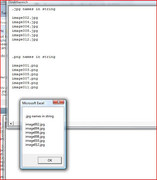
TypicalOutputFrom Sub ListThe_jpgs_pngs()
Code:
.jpg names in string
image002.jpg
image004.jpg
image006.jpg
image008.jpg
image010.jpg
image012.jpg
.png names in string
image001.png
image003.png
image005.png
image007.png
image009.png
image011.png


 Reply With Quote
Bookmarks