
later


later
….If you are my competitor, I will try all I can to beat you. But if I do, I will not belittle you. I will Salute you, because without you, I am nothing.
If you are my enemy, we will try to kick the fucking shit out of you…..
Winston Churchill, 1939
Save your Forum..._
KILL A MODERATOR!!
Coding for this post:
https://www.excelfox.com/forum/showt...age2#post23768
Note: The global variable declarations, Dim Clm As Long, Reocopy As Long , must be included at the top of the code module, so that they workm independently of the macros using them. Otherwise if they were declared inside any macro they would be local to that macro and could not be accessed by different macros as we need them to be. Just to explain that again a bit differently. If for example the declaration was done inside the recursion / reoccurring macro, then there would be an independent one for each copy of the recursion / reoccurring macro. That would only be referenced to by the code lines like Reocopy = Reocopy + 1 , Reocopy = Reocopy – 1 , and Clm = Clm + 1 specific to that copy, and further more they would "vanish" at the end of any copy macro. So those sort of declared variables could not be used to keep a running total or continual copy number reference which we want.
Code:Option Explicit Dim Clm As Long, Reocopy As Long ' variable for column number to put file or folder details in, number representin the copy of the second macro Sub PassFolderForReocursing2() 'Sub SchellFolderDetails2() ' Jan 2024 https://www.excelfox.com/forum/showthread.php/2936-YouTube-Video-making-and-editing-etc-coupled-to-excelfox-(-windows-Movie-Maker-)/page2#post23775 Rem 0 Let Clm = 0: Reocopy = -1 Rem 1 Dim Ws As Worksheet: Set Ws = Me ' G:\YouTubeVideos&Anaslysis&HackingTricks\VideoRecordingEditing\Windows (Live) Movie Maker\Movie Maker Versions.xls ' 1b Dim Parf As String ' Let Parf = ThisWorkbook.Path & "\Versions Downloads Exes\Verson 2, 2 1 2 5 Downloads 2,1\50 Euro Keks" ' Let Parf = ThisWorkbook.Path & "\50 Euro Keks" Let Parf = ThisWorkbook.Path ' 1c If Len(Parf) - Len(Replace(Parf, "\", "", 1, -1, vbBinaryCompare)) >= 2 Then Let ActiveCell = Mid(Parf, InStrRev(Parf, "\", InStrRev(Parf, "\", -1, vbBinaryCompare) - 1, vbBinaryCompare)) Else Let ActiveCell = Parf End If Rem 2 Windows Shell object Dim objShell As Shell32.Shell: Set objShell = New Shell32.Shell ' https://i.postimg.cc/Fz9zrnNm/Tools-Referrences-Microsoft-Shell-Controls-And-Automation.jpg https://i.postimg.cc/sDC9S54h/Tools-Referrences-Microsoft-Shell-Controls-And-Automation.jpg Dim objFolder As Shell32.Folder: Set objFolder = objShell.Namespace(Parf) ' Rem 3 Movie Maker Folder Property names and Property values. Dim Fil As Shell32.FolderItem For Each Fil In objFolder.Items ' We loop through all items to find the Movie Maker folder ' ======= If Fil.Name = "Movie Maker" Then Dim Rw As Long: Let Rw = 1 'Let ActiveCell.Offset(Rw, 0) = "Name": Let ActiveCell.Offset(Rw, 1) = objFolder.GetDetailsOf(Fil, 0) Let ActiveCell.Offset(Rw, 0) = objFolder.GetDetailsOf("Goolies", 0): Let ActiveCell.Offset(Rw, 1) = objFolder.GetDetailsOf(Fil, 0) 'Let ActiveCell.Offset(Rw + 1, 0) = "Größe": Let ActiveCell.Offset(Rw + 1, 1) = objFolder.GetDetailsOf(Fil, 1) Let ActiveCell.Offset(Rw + 1, 0) = objFolder.GetDetailsOf(71, 1): Let ActiveCell.Offset(Rw + 1, 1) = objFolder.GetDetailsOf(Fil, 1) 'Let ActiveCell.Offset(Rw + 2, 0) = "Elementtyp": Let ActiveCell.Offset(Rw + 2, 1) = objFolder.GetDetailsOf(Fil, 2) Let ActiveCell.Offset(Rw + 2, 0) = objFolder.GetDetailsOf(Parf, 2): Let ActiveCell.Offset(Rw + 2, 1) = objFolder.GetDetailsOf(Fil, 2) 'Let ActiveCell.Offset(Rw + 3, 0) = "Änderungsdatum": Let ActiveCell.Offset(Rw + 3, 1) = Left(objFolder.GetDetailsOf(Fil, 3), InStr(1, objFolder.GetDetailsOf(Fil, 3), " ", vbBinaryCompare)) Let ActiveCell.Offset(Rw + 3, 0) = objFolder.GetDetailsOf(Ws, 3): Let ActiveCell.Offset(Rw + 3, 1) = Left(objFolder.GetDetailsOf(Fil, 3), InStr(1, objFolder.GetDetailsOf(Fil, 3), " ", vbBinaryCompare)) 'Let ActiveCell.Offset(Rw + 4, 0) = "Erstelldatum": Let ActiveCell.Offset(Rw + 4, 1) = Left(objFolder.GetDetailsOf(Fil, 4), InStr(1, objFolder.GetDetailsOf(Fil, 4), " ", vbBinaryCompare)) Let ActiveCell.Offset(Rw + 4, 0) = objFolder.GetDetailsOf(Left("gh", 2), 4): Let ActiveCell.Offset(Rw + 4, 1) = Left(objFolder.GetDetailsOf(Fil, 4), InStr(1, objFolder.GetDetailsOf(Fil, 4), " ", vbBinaryCompare)) ' Let ActiveCell.Offset(Rw + 9, 0) = "Dateiversion": Let ActiveCell.Offset(Rw + 9, 1) = objFolder.GetDetailsOf(Fil, 166) Let ActiveCell.Offset(Rw + 5, 0) = objFolder.GetDetailsOf("Bum", 166): Let ActiveCell.Offset(Rw + 5, 1) = objFolder.GetDetailsOf(Fil, 166) Rem 4 ActiveCell.Offset(0, 2).Activate ' 4b Call ReoccurringFileFolderProps2(Parf & "\Movie Maker") Exit For ' Once we have passed on the full path of the folder, Movie Maker , then we are finished with this macro, so we don't need loop further looking fot the Movie Maker folder Else End If Next Fil ' =========================================================================================== End Sub ' https://www.excelfox.com/forum/showthread.php/2936-YouTube-Video-making-and-editing-etc-coupled-to-excelfox-(-windows-Movie-Maker-)/page2#post23774 Private Sub ReoccurringFileFolderProps2(ByVal Pf As String) Rem 0 Let Reocopy = Reocopy + 1 ' Originally the variable Reocopy is zero. It will become 1 on first entering the macro. Every time we leave this macro, this number is reduced by 1 So in simple use it will be 1 or zero indicating that a copy is in use. However, should this macro "Call itself", before its finished , ( the recursion idea ) then the value will be 2 and so on. So effectively it tells us which copy is running at any time Rem 1 Dim objShell As Shell32.Shell: Set objShell = New Shell32.Shell ' https://i.postimg.cc/Fz9zrnNm/Tools-Referrences-Microsoft-Shell-Controls-And-Automation.jpg https://i.postimg.cc/sDC9S54h/Tools-Referrences-Microsoft-Shell-Controls-And-Automation.jpg Dim objFolder As Shell32.Folder: Set objFolder = objShell.Namespace(Pf) ' Rem 2 Dim Fil As Shell32.FolderItem For Each Fil In objFolder.Items ' ======= Main Loop ==================================================| ' Dim Clm As Long: ' Global variable Let Clm = Clm + 1 Dim Rw As Long: Let Rw = 1 + Reocopy + 1 Let ActiveCell.Offset(Rw, Clm) = objFolder.GetDetailsOf(Fil, 0) Let ActiveCell.Offset(Rw + 1, Clm) = objFolder.GetDetailsOf(Fil, 1) Let ActiveCell.Offset(Rw + 2, Clm) = objFolder.GetDetailsOf(Fil, 2) Let ActiveCell.Offset(Rw + 3, Clm) = Left(objFolder.GetDetailsOf(Fil, 3), InStr(1, objFolder.GetDetailsOf(Fil, 3), " ", vbBinaryCompare)) Let ActiveCell.Offset(Rw + 4, Clm) = Left(objFolder.GetDetailsOf(Fil, 4), InStr(1, objFolder.GetDetailsOf(Fil, 4), " ", vbBinaryCompare)) ' Let ActiveCell.Offset(Rw + 9, 0) = "Dateiversion": Let ActiveCell.Offset(Rw + 9, 1) = objFolder.GetDetailsOf(Fil, 166) Let ActiveCell.Offset(Rw + 5, Clm) = objFolder.GetDetailsOf(Fil, 166) '_________________________________________________________________________________________________ ' 2b Here we may pause the macro, whilst another copy of it is started If objFolder.GetDetailsOf(Fil, 2) = "Dateiordner" Then Call ReoccurringFileFolderProps2(Pf & "\" & objFolder.GetDetailsOf(Fil, 0)) '_________________________________________________________________________________________________ ' If we did pause whilst the abobe code line set off another copy, then when that is finished we will come here and resume the paused previous copy Next Fil ' ============================== Main Loop =================================================| Let Reocopy = Reocopy - 1 ' We are finished at this point with this running copy of the macro. (The next code line ends it). This code line here will reduce the value used to keep track of the copy number being run End Sub
This is post
https://www.excelfox.com/forum/showt...ll=1#post23924
https://www.excelfox.com/forum/showt...ge18#post23924
Some notes in support of these Thread Posts
https://www.eileenslounge.com/viewto...313622#p313622
https://www.excelfox.com/forum/showt...age2#post23769
Here’s the thing.
The Windows Shell object, (WSO), folder item way is a nice way to get at an extensive list of folder and file properties for the files and folders , (items), in a Folder.( https://www.youtube.com/watch?v=jTmVtPHtiTg ). But it’s a bit broken in places and/ or is not so precise in some size properties. But for now I want to do the main looping with the WSO.
The main purpose of this small test macro snippet is part of investigating a combination of the Windows Shell object folder item way and the Microsoft Scripting Runtime, (FSO), way to get some properties of the files ( and sub folders and their contents ) in a programmes folder of a software. This is for the purpose of comparing different versions of the same software, ( or to help determine if something masquerading as a software is a fake or has some unexpected additions or alterations ).
Code:' To test, run this macro in any workbook that is in any folder, but that folder must also include this sample Folder, MMPropertyTest https://app.box.com/s/27u7dyjee3rez44pdjq52uu2e7tgzu8v Sub TestWindowsShellObjectFolderItemWithFSOway() ' https://www.excelfox.com/forum/showthread.php/2056-Appendix-Thread-2-(-Codes-for-other-Threads-HTML-Tables-etc-)?p=23924&viewfull=1#post23924 https://www.eileenslounge.com/viewtopic.php?p=313622#p313622 https://www.excelfox.com/forum/showthread.php/2936-YouTube-Video-making-and-editing-etc-coupled-to-excelfox-(-windows-Movie-Maker-)/page2#post23769 ' Early Binding Microsoft Scripting Runtime 'Dim objFSO As Scripting.FileSystemObject: Set objFSO = New Scripting.FileSystemObject ' https://i.postimg.cc/d1GHPGxJ/Microsoft-Scripting-Runtime-Library.jpg ' Late Binding Dim objFSO As Object: Set objFSO = CreateObject("Scripting.FileSystemObject") ' Early Binding for windows shell object Microsoft Shell Controls And Automation 'Dim objWSO As Shell32.Shell: Set objWSO = New Shell32.Shell ' https://i.postimg.cc/Fz9zrnNm/Tools-Referrences-Microsoft-Shell-Controls-And-Automation.jpg https://i.postimg.cc/sDC9S54h/Tools-Referrences-Microsoft-Shell-Controls-And-Automation.jpg ' Late Binding Dim objWSO As Object: Set objWSO = CreateObject("shell.application") 'Dim objWSOFolder As Shell32.Folder Dim objWSOFolder As Object ' ------- This section may not be needed by most people. I dabble in both English and German systems so I can't easilly hard code the item type name given for a folder by the WSO ( In German operating systems it is Dateiordner ) Set objWSOFolder = objWSO.Namespace(ThisWorkbook.Path) 'Dim FldItm As Shell32.FolderItem Dim FldItm As Object For Each FldItm In objWSOFolder.Items Dim NmeOfAFldr As String If objWSOFolder.GetDetailsOf(FldItm, 0) = "MMPropertyTest" Then Let NmeOfAFldr = objWSOFolder.GetDetailsOf(FldItm, 2): Debug.Print NmeOfAFldr ' In German OS this is Dateiordner Exit For ' I got what I want so don't meed to loop anymore Else End If Next FldItm ' ------- ' Now move on to getting some property detains of all items in the WSO folder object, objWSOFolder Set objWSOFolder = objWSO.Namespace(ThisWorkbook.Path & "\MMPropertyTest") 'Dim FldItm As Shell32.FolderItem For Each FldItm In objWSOFolder.Items Dim Clm As Long: Let Clm = Clm + 1 ' For convenience each items properties will be put in the next column Dim Rw As Long: Let Rw = 1 ' The row of the property ' Property Name of file or folder Let ActiveCell.Offset(Rw, Clm) = objWSOFolder.GetDetailsOf(FldItm, 0) ' Name of folder or file using the WSO way ' Property File or folder size. I use the FSO for this to get a better precision and also because it seems to be broken for a folder item in WSO If objWSOFolder.GetDetailsOf(FldItm, 2) = NmeOfAFldr Then ' GetDetailsOf(FldItm, 2) tells me the type of the WSO item 'Dim objFSOFolder As Scripting.Folder: Set objFSOFolder = objFSO.GetFolder(ThisWorkbook.Path & "\MMPropertyTest\" & objWSOFolder.GetDetailsOf(FldItm, 0)) Dim objFSOFolder As Object: Set objFSOFolder = objFSO.GetFolder(ThisWorkbook.Path & "\MMPropertyTest\" & objWSOFolder.GetDetailsOf(FldItm, 0)) Let ActiveCell.Offset(Rw + 1, Clm) = objFSOFolder.Size Else ' If the item is not a folder, then I assume it will be a file? 'Dim ObjFSOFile As Scripting.File: Set ObjFSOFile = objFSO.GetFile(ThisWorkbook.Path & "\MMPropertyTest\" & objWSOFolder.GetDetailsOf(FldItm, 0)) Dim ObjFSOFile As Object: Set ObjFSOFile = objFSO.GetFile(ThisWorkbook.Path & "\MMPropertyTest\" & objWSOFolder.GetDetailsOf(FldItm, 0)) Let ActiveCell.Offset(Rw + 1, Clm) = ObjFSOFile.Size End If ' Property Date Last Modified Änderungsdatum Let ActiveCell.Offset(Rw + 2, Clm) = Format(objWSOFolder.GetDetailsOf(FldItm, 3), "dd,mmm,yy") ' Property Date Created Erstelldatum Let ActiveCell.Offset(Rw + 3, Clm) = Format(objWSOFolder.GetDetailsOf(FldItm, 4), "dd,mmm,yy") ' Property Version Let ActiveCell.Offset(Rw + 4, Clm) = objWSOFolder.GetDetailsOf(FldItm, 166) Next FldItm End Sub
To test this coding, put this test folder,
MMPropertyTest https://app.box.com/s/27u7dyjee3rez44pdjq52uu2e7tgzu8v
, in any folder. Run the macro from any Excel file that is in the same folder that you put the folder MMPropertyTest in.
The results should be of this sort of form:
https://i.postimg.cc/k4FLjVpG/WSOwith-FSO-Test.jpg
MMPropertyTest https://app.box.com/s/27u7dyjee3rez44pdjq52uu2e7tgzu8v
Last edited by DocAElstein; 01-27-2024 at 02:34 AM.
I took another little time out, as I was trying to tidy up my recursion / reoccurring coding, and I got a bit annoyed by Me.ActiveSheet not working.
https://eileenslounge.com/viewtopic.php?f=30&t=40560
I have that one sussed now I think,
https://www.excelfox.com/forum/showt...ll=1#post23926
See also the next few posts, ( as referenced from https://eileenslounge.com/viewtopic.php?f=30&t=40560 )
So onward with the recursion/reoccurring coding, with a few modifications, mainly for the improved size property figures, but also a bit of general tidying up
Here is the next version of the recursion/ reoccurring coding
Code:Option Explicit ' "Global" variables that must be declared here Dim Clm As Long, Reocopy As Long ' variable for column number to put file or folder details in, number representing the copy of the second macro running at any time ' Variables useful/ efficient to declare here as "Global" variables Dim objWSO As Shell32.Shell ' Early Binding ' Set objShell = New Shell32.Shell ' https://i.postimg.cc/Fz9zrnNm/Tools-Referrences-Microsoft-Shell-Controls-And-Automation.jpg https://i.postimg.cc/sDC9S54h/Tools-Referrences-Microsoft-Shell-Controls-And-Automation.jpg Dim objFSO As Scripting.FileSystemObject ' Early Binding ' Set objFSO = New Scripting.FileSystemObject ' https://i.postimg.cc/d1GHPGxJ/Microsoft-Scripting-Runtime-Library.jpg Dim MeActiveCell As Range ' For convenience all output will be referred to a start point. The user should make a selection in the workbook window that has the worksheet for output showing in it. We will then be able to get the ramge object into VBA from the ActiveCell property of that workbook window Sub PassFolderForReocursing3() ' Rem 0 Let Clm = 1: Reocopy = 0 ' When this macro starts we have not started any output so our column number for output should not yet have been set, and no copies of the next macro will be running so the variable keeping track of the copy number of that macro should not have a number >= 1 Rem 1 Dim Ws As Worksheet: Set Ws = Me ' This is and the next bits are a personal preferrence. I like to fully explicitly tell VBA where things are, and I also have a habit of putting coding intended for a worksheet in that particular worksheets code module. Many people work on whatever worksheet is active, so they may prefer to change this to Set Ws = Application.ActiveSheet, and use that in the next bit. Me.Activate: Set MeActiveCell = Workbooks(Me.Parent.Name).Windows.Item(1).ActiveCell ' https://eileenslounge.com/viewtopic.php?p=313747#p313747 ' 1b Dim Parf As String: Let Parf = ThisWorkbook.Path ' This should be given the path to the folder where the folder of interest is, so theere is a good chance this will need to be changed to suit quit often. ' 1c A short string part of the path put top left, not necerssary but just useful for later referrence to give indication of where the main folder was got from If Len(Parf) - Len(Replace(Parf, "\", "", 1, -1, vbBinaryCompare)) >= 2 Then ' For a longer path it may be convenient to shorten the output given to the last bit Let MeActiveCell = Mid(Parf, InStrRev(Parf, "\", InStrRev(Parf, "\", -1, vbBinaryCompare) - 1, vbBinaryCompare)) Else ' For a shorter path we can give the full path Let MeActiveCell = Parf End If Rem 2 Windows Shell object Set objWSO = New Shell32.Shell ' https://i.postimg.cc/Fz9zrnNm/Tools-Referrences-Microsoft-Shell-Controls-And-Automation.jpg https://i.postimg.cc/sDC9S54h/Tools-Referrences-Microsoft-Shell-Controls-And-Automation.jpg Dim objWSOFolder As Shell32.Folder: Set objWSOFolder = objWSO.Namespace(Parf) Rem 3 Movie Maker Folder Property names and Property values. Dim FldItm As Shell32.FolderItem For Each FldItm In objWSOFolder.Items ' We loop through all items to find the Movie Maker folder ' ======= If FldItm.Name = "Movie Maker" Then Dim Rw As Long: Let Rw = 1 ' Property Name of file or folder Let MeActiveCell.Offset(Rw, 0) = objWSOFolder.GetDetailsOf("Willy", 0) Let MeActiveCell.Offset(Rw, Clm) = objWSOFolder.GetDetailsOf(FldItm, 0) ' Name of folder or file using the WSO way ' Property File or folder size. I use the FSO for this to get a better precision and also because it seems to be broken for a folder item in WSO Let MeActiveCell.Offset(Rw + 1, 0) = objWSOFolder.GetDetailsOf("Wonka", 1) If objWSOFolder.GetDetailsOf(FldItm, 2) = "Dateiordner" Then ' GetDetailsOf(FldItm, 2) tells me the type of the WSO item Set objFSO = New Scripting.FileSystemObject ' https://i.postimg.cc/d1GHPGxJ/Microsoft-Scripting-Runtime-Library.jpg 'Dim objFSOFolder As Scripting.Folder: Set objFSOFolder = objFSO.GetFolder(ThisWorkbook.Path & "\MMPropertyTest\" & objWSOFolder.GetDetailsOf(FldItm, 0)) Dim objFSOFolder As Scripting.Folder: Set objFSOFolder = objFSO.GetFolder(ThisWorkbook.Path & "\" & objWSOFolder.GetDetailsOf(FldItm, 0)) Let MeActiveCell.Offset(Rw + 1, Clm) = objFSOFolder.Size Else ' If the item is not a folder, then I assume it will be a file? Dim ObjFSOFile As Scripting.File: Set ObjFSOFile = objFSO.GetFile(ThisWorkbook.Path & "\" & objWSOFolder.GetDetailsOf(FldItm, 0)) Let MeActiveCell.Offset(Rw + 1, Clm) = ObjFSOFile.Size End If ' Property Date Last Modified Änderungsdatum Let MeActiveCell.Offset(Rw + 2, 0) = objWSOFolder.GetDetailsOf(42, 3) Let MeActiveCell.Offset(Rw + 2, Clm) = Format(objWSOFolder.GetDetailsOf(FldItm, 3), "dd,mmm,yy") ' Property Date Created Erstelldatum Let MeActiveCell.Offset(Rw + 3, 0) = objWSOFolder.GetDetailsOf(42, 4) Let MeActiveCell.Offset(Rw + 3, Clm) = Format(objWSOFolder.GetDetailsOf(FldItm, 4), "dd,mmm,yy") ' Property Version Let MeActiveCell.Offset(Rw + 4, Clm) = objWSOFolder.GetDetailsOf(666, 166) Let MeActiveCell.Offset(Rw + 4, Clm) = objWSOFolder.GetDetailsOf(FldItm, 166) Rem 4 Let Clm = 0 MeActiveCell.Offset(0, 2).Select: Set MeActiveCell = Workbooks(Me.Parent.Name).Windows.Item(1).ActiveCell ' https://eileenslounge.com/viewtopic.php?p=313747#p313747 ' 4b Call ReoccurringFldItmeFolderProps3(Parf & "\Movie Maker") Exit For ' Once we have passed on the full path of the folder, Movie Maker , then we are finished with this macro, so we don't need loop further looking fot the Movie Maker folder Else End If Next FldItm ' =========================================================================================== End Sub Private Sub ReoccurringFldItmeFolderProps3(ByVal Pf As String) Rem 0 Let Reocopy = Reocopy + 1 ' Originally the variable Reocopy is zero. It will become 1 on first entering the macro. Every time we leave this macro, this number is reduced by 1 So in simple use it will be 1 or zero indicating that a copy is in use. However, should this macro "Call itself", before its finished , ( the recursion idea ) then the value will be 2 and so on. So effectively it tells us which copy is running at any time Rem 1 Set objWSO = New Shell32.Shell ' https://i.postimg.cc/Fz9zrnNm/Tools-Referrences-Microsoft-Shell-Controls-And-Automation.jpg https://i.postimg.cc/sDC9S54h/Tools-Referrences-Microsoft-Shell-Controls-And-Automation.jpg Dim objWSOFolder As Shell32.Folder: Set objWSOFolder = objWSO.Namespace(Pf) ' Rem 2 Dim FldItm As Shell32.FolderItem For Each FldItm In objWSOFolder.Items ' ======= Main Loop ==================================================| ' Dim Clm As Long: ' Global variable Let Clm = Clm + 1 Dim Rw As Long: Let Rw = Reocopy + 1 Let MeActiveCell.Offset(Rw, Clm) = objWSOFolder.GetDetailsOf(FldItm, 0) If objWSOFolder.GetDetailsOf(FldItm, 2) = "Dateiordner" Then ' GetDetailsOf(FldItm, 2) tells me the type of the WSO item Set objFSO = New Scripting.FileSystemObject ' https://i.postimg.cc/d1GHPGxJ/Microsoft-Scripting-Runtime-Library.jpg 'Dim objFSOFolder As Scripting.Folder: Set objFSOFolder = objFSO.GetFolder(ThisWorkbook.Path & "\MMPropertyTest\" & objWSOFolder.GetDetailsOf(FldItm, 0)) Dim objFSOFolder As Scripting.Folder: Set objFSOFolder = objFSO.GetFolder(Pf & "\" & objWSOFolder.GetDetailsOf(FldItm, 0)) Let MeActiveCell.Offset(Rw + 1, Clm) = objFSOFolder.Size Else ' If the item is not a folder, then I assume it will be a file? Dim ObjFSOFile As Scripting.File: Set ObjFSOFile = objFSO.GetFile(Pf & "\" & objWSOFolder.GetDetailsOf(FldItm, 0)) Let MeActiveCell.Offset(Rw + 1, Clm) = ObjFSOFile.Size End If Let MeActiveCell.Offset(Rw + 2, Clm) = Format(objWSOFolder.GetDetailsOf(FldItm, 3), "dd,mmm,yy") Let MeActiveCell.Offset(Rw + 3, Clm) = Format(objWSOFolder.GetDetailsOf(FldItm, 4), "dd,mmm,yy") Let MeActiveCell.Offset(Rw + 4, Clm) = objWSOFolder.GetDetailsOf(FldItm, 166) '_________________________________________________________________________________________________ ' 2b Here we may pause the macro, whilst another copy of it is started If objWSOFolder.GetDetailsOf(FldItm, 2) = "Dateiordner" Then Call ReoccurringFldItmeFolderProps3(Pf & "\" & objWSOFolder.GetDetailsOf(FldItm, 0)) '_________________________________________________________________________________________________ ' If we did pause whilst the abobe code line set off another copy, then when that is finished we will come here and resume the paused previous copy Next FldItm ' ============================== Main Loop =================================================| Let Reocopy = Reocopy - 1 ' We are finished at this point with this running copy of the macro. (The next code line ends it). This code line here will reduce the value used to keep track of the copy number being run End Sub
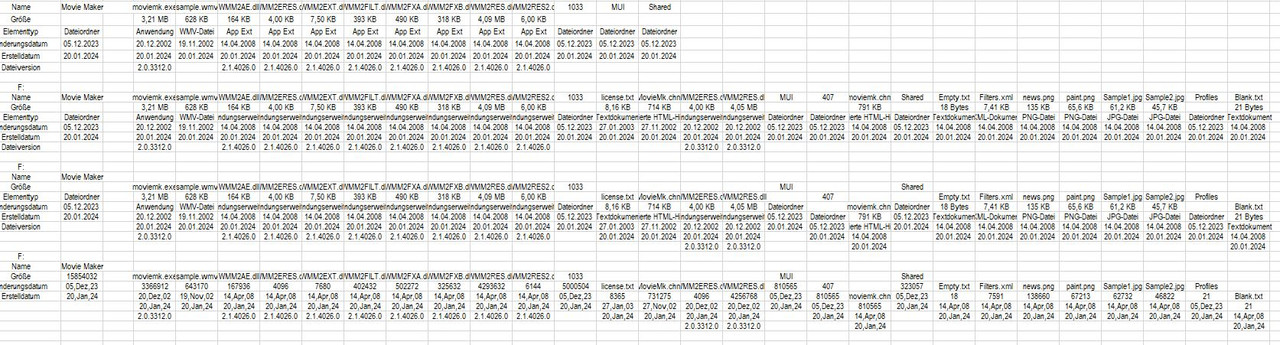
Working on this Movie Maker folder,
Movie Maker https://app.box.com/s/cxvc735a85q6az2r3gtb7ii9w2p3jzpf
, gives this https://i.postimg.cc/Gt7rMkSM/Recurs...g-coding-3.jpg
And here all the codings so far
https://i.postimg.cc/sxDs9nKQ/Initia...ng-outputs.jpg
To demo: See next post
Last edited by DocAElstein; 01-27-2024 at 03:35 AM.
To Demo: Put Folder, Movie Maker , and file Movie Maker Versions.xls in the same place
Test Folder
Movie Maker https://app.box.com/s/cxvc735a85q6az2r3gtb7ii9w2p3jzpf
Run the macro Sub PassFolderForReocursing3() from withing the worksheets Version 2 code module in this file
Movie Maker Versions.xls https://app.box.com/s/axle7nflnmgkfbztto1wsmhc2ml2ynes
As per the demo, Working on this Movie Maker folder,
Movie Maker https://app.box.com/s/cxvc735a85q6az2r3gtb7ii9w2p3jzpf
, should give this https://i.postimg.cc/Gt7rMkSM/Recurs...g-coding-3.jpg
And here all the codings so far
https://i.postimg.cc/sxDs9nKQ/Initia...ng-outputs.jpg
The whole point of all this is to do this sort of manually looking at stuff better and quicker.
https://i.postimg.cc/7YJxCzCw/Explor...nd-Folders.jpg

Last edited by DocAElstein; 01-27-2024 at 08:22 PM.
Some screen shots for this post https://eileenslounge.com/viewtopic....313792#p313792

......Here a slightly simpler demo, just for Eileens Lounge..., but it’s a real example looking at one of the smaller Folders I have been wanting to investigate.
To do it:
Put the uploaded file, EileenMMDemo.xls, and this folder ,
Movie Maker https://app.box.com/s/cxvc735a85q6az2r3gtb7ii9w2p3jzpf
, in the same place. Then just open the file EileenMMDemo.xls. That file only has one worksheet so the workbook should show just one window of that. In that window make a selection towards the left. Now run the only available macro, Sub PassFolderForReocursing3() , in that workbook which is in the only code module. At the start of the macro it will use the ActiveCell of that window to try and get a single cell range object from the your window Selection . It usually manages that, and goes on to put some results out with that cell at top left. It should look something like this
Last edited by DocAElstein; 01-27-2024 at 12:50 AM.
Here is the main recursion / reoccurring macro 3 corrected slightly for to get the Late Binding working correctly
A couple of things were wrong, or rather one thing wrong, which hid a another problem that should have occurred: I had a few things not declared as objects as they should have been. As I coincidently still had the two library references checked, all still worked, and so did a string variable in this bit Set objWSOFolder = objWSO.Namespace(Pf)
Taking the references off, revealed the problem. Once that was fixed the other problem cropped up https://stackoverflow.com/questions/...88851#77888851
https://microsoft.public.access.nark...d-in-vba#post5
This next coding is OK, I think
Recursion / Reoccring part in next postCode:Option Explicit ' "Global" variables that must be declared here Dim Clm As Long, Reocopy As Long ' variable for column number to put file or folder details in, number representing the copy of the second macro running at any time ' Variables useful/ efficient to declare here as "Global" variables 'Dim objWSO As Shell32.Shell ' Early Binding ' Set objShell = New Shell32.Shell ' https://i.postimg.cc/Fz9zrnNm/Tools-Referrences-Microsoft-Shell-Controls-And-Automation.jpg https://i.postimg.cc/sDC9S54h/Tools-Referrences-Microsoft-Shell-Controls-And-Automation.jpg Dim objWSO As Object ' Late Binding 'Dim objFSO As Scripting.FileSystemObject ' Early Binding ' Set objFSO = New Scripting.FileSystemObject ' https://i.postimg.cc/d1GHPGxJ/Microsoft-Scripting-Runtime-Library.jpg Dim objFSO As Object ' Late Binding Dim MeActiveCell As Range ' For convenience all output will be referred to a start point. The user should make a selection in the workbook window that has the worksheet for output showing in it. We will then be able to get the ramge object into VBA from the ActiveCell property of that workbook window Sub PassFolderForReocursing3() ' Rem 0 Let Clm = 1: Reocopy = 0 ' When this macro starts we have not started any output so our column number for output should not yet have been set, and no copies of the next macro will be running so the variable keeping track of the copy number of that macro should not have a number >= 1 Rem 1 Dim Ws As Worksheet: Set Ws = Me ' This is and the next bits are a personal preferrence. I like to fully explicitly tell VBA where things are, and I also have a habit of putting coding intended for a worksheet in that particular worksheets code module. Many people work on whatever worksheet is active, so they may prefer to change this to Set Ws = Application.ActiveSheet, and use that in the next bit. Me.Activate: Set MeActiveCell = Workbooks(Me.Parent.Name).Windows.Item(1).ActiveCell ' https://eileenslounge.com/viewtopic.php?p=313747#p313747 ' 1b Dim Parf As String: Let Parf = ThisWorkbook.Path ' This should be given the path to the folder where the folder of interest is, so theere is a good chance this will need to be changed to suit quit often. ' 1c A short string part of the path put top left, not necerssary but just useful for later referrence to give indication of where the main folder was got from If Len(Parf) - Len(Replace(Parf, "\", "", 1, -1, vbBinaryCompare)) >= 2 Then ' For a longer path it may be convenient to shorten the output given to the last bit Let MeActiveCell = Mid(Parf, InStrRev(Parf, "\", InStrRev(Parf, "\", -1, vbBinaryCompare) - 1, vbBinaryCompare)) Else ' For a shorter path we can give the full path Let MeActiveCell = Parf End If Rem 2 Windows Shell object ' Set objwso = New Shell32.Shell ' https://i.postimg.cc/Fz9zrnNm/Tools-Referrences-Microsoft-Shell-Controls-And-Automation.jpg https://i.postimg.cc/sDC9S54h/Tools-Referrences-Microsoft-Shell-Controls-And-Automation.jpg Set objWSO = CreateObject("shell.application") 'Dim objWSOFolder As Shell32.Folder: Set objWSOFolder = objWSO.Namespace(Parf) Dim objWSOFolder As Object: Set objWSOFolder = objWSO.Namespace(Parf & "") ' & "" https://stackoverflow.com/questions/33868233/shell-namespace-not-accepting-string-variable-but-accepting-string-itself/77888851#77888851 https://microsoft.public.access.narkive.com/Jl55mts5/problem-using-shell-namespace-method-in-vba#post5 Rem 3 Movie Maker Folder Property names and Property values. 'Dim FldItm As Shell32.FolderItem Dim FldItm As Object For Each FldItm In objWSOFolder.Items ' We loop through all items to find the Movie Maker folder ' ======= If FldItm.Name = "Movie Maker" Then Dim Rw As Long: Let Rw = 1 ' Property Name of file or folder Let MeActiveCell.Offset(Rw, 0) = objWSOFolder.GetDetailsOf("Willy", 0) Let MeActiveCell.Offset(Rw, Clm) = objWSOFolder.GetDetailsOf(FldItm, 0) ' Name of folder or file using the WSO way ' Property File or folder size. I use the FSO for this to get a better precision and also because it seems to be broken for a folder item in WSO Let MeActiveCell.Offset(Rw + 1, 0) = objWSOFolder.GetDetailsOf("Wonka", 1) If objWSOFolder.GetDetailsOf(FldItm, 2) = "Dateiordner" Then ' GetDetailsOf(FldItm, 2) tells me the type of the WSO item 'Set objFSO = New Scripting.FileSystemObject ' https://i.postimg.cc/d1GHPGxJ/Microsoft-Scripting-Runtime-Library.jpg Set objFSO = CreateObject("Scripting.FileSystemObject") 'Dim objFSOFolder As Scripting.Folder: Set objFSOFolder = objFSO.GetFolder(ThisWorkbook.Path & "\" & objWSOFolder.GetDetailsOf(FldItm, 0)) Dim objFSOFolder As Object: Set objFSOFolder = objFSO.GetFolder(ThisWorkbook.Path & "\" & objWSOFolder.GetDetailsOf(FldItm, 0)) Let MeActiveCell.Offset(Rw + 1, Clm) = objFSOFolder.Size Else ' If the item is not a folder, then I assume it will be a file? 'Dim ObjFSOFile As Scripting.File: Set ObjFSOFile = objFSO.GetFile(ThisWorkbook.Path & "\" & objWSOFolder.GetDetailsOf(FldItm, 0)) Dim ObjFSOFile As Object: Set ObjFSOFile = objFSO.GetFile(ThisWorkbook.Path & "\" & objWSOFolder.GetDetailsOf(FldItm, 0)) Let MeActiveCell.Offset(Rw + 1, Clm) = ObjFSOFile.Size End If ' Property Date Last Modified Änderungsdatum Let MeActiveCell.Offset(Rw + 2, 0) = objWSOFolder.GetDetailsOf(42, 3) Let MeActiveCell.Offset(Rw + 2, Clm) = Format(objWSOFolder.GetDetailsOf(FldItm, 3), "dd,mmm,yy") ' Property Date Created Erstelldatum Let MeActiveCell.Offset(Rw + 3, 0) = objWSOFolder.GetDetailsOf(42, 4) Let MeActiveCell.Offset(Rw + 3, Clm) = Format(objWSOFolder.GetDetailsOf(FldItm, 4), "dd,mmm,yy") ' Property Version Let MeActiveCell.Offset(Rw + 4, Clm) = objWSOFolder.GetDetailsOf(666, 166) Let MeActiveCell.Offset(Rw + 4, Clm) = objWSOFolder.GetDetailsOf(FldItm, 166) Rem 4 Let Clm = 0 MeActiveCell.Offset(0, 2).Select: Set MeActiveCell = Workbooks(Me.Parent.Name).Windows.Item(1).ActiveCell ' https://eileenslounge.com/viewtopic.php?p=313747#p313747 ' 4b Call ReoccurringFldItmeFolderProps3(Parf & "\Movie Maker") Exit For ' Once we have passed on the full path of the folder, Movie Maker , then we are finished with this macro, so we don't need loop further looking fot the Movie Maker folder Else End If Next FldItm ' =========================================================================================== End Sub
Last edited by DocAElstein; 01-27-2024 at 01:37 PM.
Code:Private Sub ReoccurringFldItmeFolderProps3(ByVal Pf As String) Rem 0 Let Reocopy = Reocopy + 1 ' Originally the variable Reocopy is zero. It will become 1 on first entering the macro. Every time we leave this macro, this number is reduced by 1 So in simple use it will be 1 or zero indicating that a copy is in use. However, should this macro "Call itself", before its finished , ( the recursion idea ) then the value will be 2 and so on. So effectively it tells us which copy is running at any time Rem 1 'Set objWSO = New Shell32.Shell ' https://i.postimg.cc/Fz9zrnNm/Tools-Referrences-Microsoft-Shell-Controls-And-Automation.jpg https://i.postimg.cc/sDC9S54h/Tools-Referrences-Microsoft-Shell-Controls-And-Automation.jpg Set objWSO = CreateObject("shell.application") 'Dim objWSOFolder As Shell32.Folder: Set objWSOFolder = objWSO.Namespace((Pf)) ' Dim objWSOFolder As Object: Set objWSOFolder = objWSO.Namespace((Pf)) ' (( )) https://stackoverflow.com/questions/33868233/shell-namespace-not-accepting-string-variable-but-accepting-string-itself/77888851#77888851 https://microsoft.public.access.narkive.com/Jl55mts5/problem-using-shell-namespace-method-in-vba#post5 Rem 2 'Dim FldItm As Shell32.FolderItem Dim FldItm As Object For Each FldItm In objWSOFolder.Items ' ======= Main Loop ==================================================| ' Dim Clm As Long: ' Global variable Let Clm = Clm + 1 Dim Rw As Long: Let Rw = Reocopy + 1 Let MeActiveCell.Offset(Rw, Clm) = objWSOFolder.GetDetailsOf(FldItm, 0) If objWSOFolder.GetDetailsOf(FldItm, 2) = "Dateiordner" Then ' GetDetailsOf(FldItm, 2) tells me the type of the WSO item 'Set objFSO = New Scripting.FileSystemObject ' https://i.postimg.cc/d1GHPGxJ/Microsoft-Scripting-Runtime-Library.jpg Set objFSO = CreateObject("Scripting.FileSystemObject") 'Dim objFSOFolder As Scripting.Folder: Set objFSOFolder = objFSO.GetFolder(Pf & "\" & objWSOFolder.GetDetailsOf(FldItm, 0)) Dim objFSOFolder As Object: Set objFSOFolder = objFSO.GetFolder(Pf & "\" & objWSOFolder.GetDetailsOf(FldItm, 0)) Let MeActiveCell.Offset(Rw + 1, Clm) = objFSOFolder.Size Else ' If the item is not a folder, then I assume it will be a file? 'Dim ObjFSOFile As Scripting.File: Set ObjFSOFile = objFSO.GetFile(Pf & "\" & objWSOFolder.GetDetailsOf(FldItm, 0)) Dim ObjFSOFile As Object: Set ObjFSOFile = objFSO.GetFile(Pf & "\" & objWSOFolder.GetDetailsOf(FldItm, 0)) Let MeActiveCell.Offset(Rw + 1, Clm) = ObjFSOFile.Size End If Let MeActiveCell.Offset(Rw + 2, Clm) = Format(objWSOFolder.GetDetailsOf(FldItm, 3), "dd,mmm,yy") Let MeActiveCell.Offset(Rw + 3, Clm) = Format(objWSOFolder.GetDetailsOf(FldItm, 4), "dd,mmm,yy") Let MeActiveCell.Offset(Rw + 4, Clm) = objWSOFolder.GetDetailsOf(FldItm, 166) '_________________________________________________________________________________________________ ' 2b Here we may pause the macro, whilst another copy of it is started If objWSOFolder.GetDetailsOf(FldItm, 2) = "Dateiordner" Then Call ReoccurringFldItmeFolderProps3(Pf & "\" & objWSOFolder.GetDetailsOf(FldItm, 0)) '_________________________________________________________________________________________________ ' If we did pause whilst the abobe code line set off another copy, then when that is finished we will come here and resume the paused previous copy Next FldItm ' ============================== Main Loop =================================================| Let Reocopy = Reocopy - 1 ' We are finished at this point with this running copy of the macro. (The next code line ends it). This code line here will reduce the value used to keep track of the copy number being run End Sub
Last edited by DocAElstein; 01-27-2024 at 04:04 AM.
Some extended notes to go with this Thread post answer
https://eileenslounge.com/viewtopic....313747#p313747
Hans set me straight with this nice concise bit https://eileenslounge.com/viewtopic....313743#p313743 , ( snb went off with a characteristic 80% Troll answer along the way, but I went along with it this time https://eileenslounge.com/viewtopic....313578#p313578
https://eileenslounge.com/viewtopic....313622#p313622
https://www.excelfox.com/forum/showt...ll=1#post23917 )
Finally another post from Hans, thereafter I had it clear ……..
Interesting.Originally Posted by HansV
I had a feeling there where multiple window possibilities around and it scared me a bit for a couple of reasons:
_ one being I figured it would be something that I would easily get in a muddle with;
_ the other reason being that how things can or do get displayed in multiple windows or multiple instances is a bit controversial I think
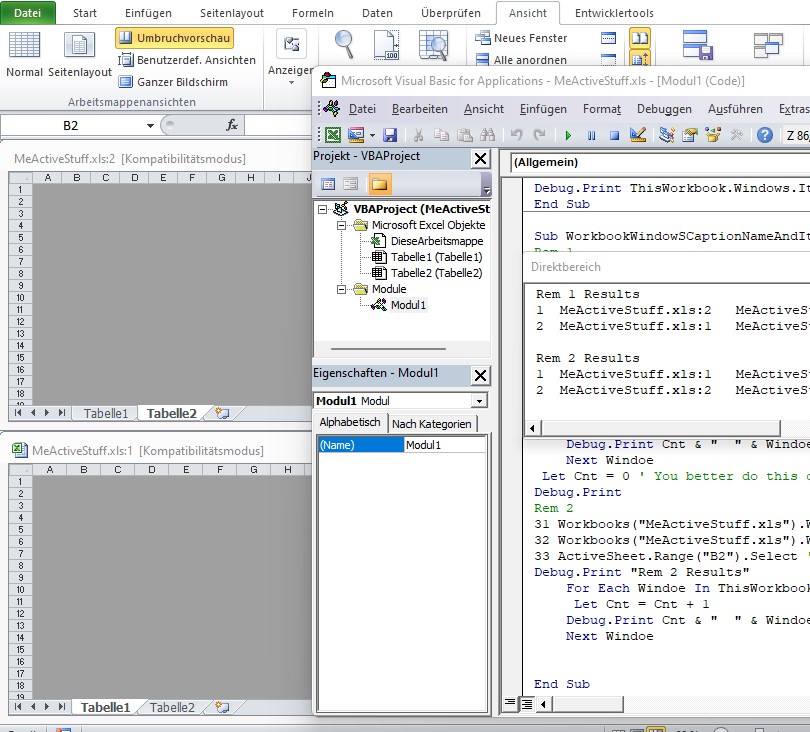
Nevertheless, I took the plunge, and did try for the first time in my life to get a multiple workbook window. It was quite easy, (I did it manually, - there are plenty of simple tutorials on the internet to show you how), for example, with my first sample file, MeActiveStuff.xls , I ended up with these 2 windows after a couple of clicks
MeActiveStuff.xls:1
and
MeActiveStuff.xls:2
( It demonstrates why I like to keep a few Excel versions, even some newer versions despite preferring older ones: In this case things will look a bit different for the multiple workbook window and that’s one of the controversial things some people get excited about, I believe. I am staying neutral on that one as I never needed multiple workbook windows, instanciated or not)
https://i.postimg.cc/qRfGpY00/XL-201...-2-windows.jpg https://i.postimg.cc/cHQBCm43/XL-201...ws-1-and-2.jpg
It is interesting though to help get this last bit of stuff a bit clearer in my mind, but at the same time, it's confirmed that it’s a bit confusing, at least for me: I think you have to be very very careful you don’t get mixed up……
At first I thought the
window item number and window caption name alternatives
might be a parallel idea to the
string tab name or item position number alternatives
for a worksheet. Whether it is or not perhaps depends on your view point, literally and mentally
This little demo macro might be useful for future reference: The main bits are 3 sets of 3 line sections. The first and third set of 3 lines are identical and the second is not much different.
If I have got it right, the 3 lines do the necessary to make the same two "ActiveCells" that my original Sub MesActiveCell() did. In that original attempt, I did not really make two ActiveCells , what really I did was set some memory of the last selection made on the two worksheets of the file MeActiveStuff.xlsCode:Sub WorkbookWindowSCaptionNameAndItems() ' https://eileenslounge.com/viewtopic.php?p=313747#p313747 Rem 1 ' 1a) Make a ActiveCell in B2 of the first worksheet 11 Workbooks("MeActiveStuff.xls").Windows.Item("MeActiveStuff.xls:1").Activate 12 Workbooks("MeActiveStuff.xls").Worksheets.Item(1).Activate 13 ActiveSheet.Range("B2").Select ' Effectively this will Make the ActiveCell in Workbooks("MeActiveStuff.xls"), Windows.Item("MeActiveStuff.xls:1") range B2 in the first worksheet ' 1b) Make a ActiveCell in A2 of the second worksheet 21 Workbooks("MeActiveStuff.xls").Windows.Item("MeActiveStuff.xls:2").Activate 22 Workbooks("MeActiveStuff.xls").Worksheets.Item(2).Activate 23 ActiveSheet.Range("A2").Select ' Effectively this will Make the ActiveCell in Workbooks("MeActiveStuff.xls"), Windows.Item("MeActiveStuff.xls:2") range A2 in the second worksheet Debug.Print "Rem 1 Results" Dim Windoe As Object, Cnt As Long For Each Windoe In ThisWorkbook.Windows Let Cnt = Cnt + 1 Debug.Print Cnt & " " & Windoe.Caption & " " & ThisWorkbook.Windows.Item(Cnt).Caption & " " & ThisWorkbook.Windows.Item(Cnt).ActiveCell.Address(, , , External:=True) Next Windoe Let Cnt = 0 ' You better do this or else in the next loop you will be trying to get at Item numbers above 2, and we aint got any Debug.Print Rem 2 repeat the first 3 lines - remake the first ActiveCell in B2 of the first worksheet 31 Workbooks("MeActiveStuff.xls").Windows.Item("MeActiveStuff.xls:1").Activate 32 Workbooks("MeActiveStuff.xls").Worksheets.Item(1).Activate 33 ActiveSheet.Range("B2").Select ' Effectively this will Make the ActiveCell in Workbooks("MeActiveStuff.xls"), Windows.Item("MeActiveStuff.xls:1") range B2 in the first worksheet Debug.Print "Rem 2 Results" For Each Windoe In ThisWorkbook.Windows Let Cnt = Cnt + 1 Debug.Print Cnt & " " & Windoe.Caption & " " & ThisWorkbook.Windows.Item(Cnt).Caption & " " & ThisWorkbook.Windows.Item(Cnt).ActiveCell.Address(, , , External:=True) Next Windoe End Sub
The third line set simply do exactly what the first did again. So there are really only two unique sets of 3 lines. Each unique set now actually makes a real ActiveCell from the same two selections I did before in my original Sub MesActiveCell()
There are two similar sets of output results, the first set is given out after making the two ActiveCells,
and the second results are given out after the first ActiveCell is made again. Obviously this last set of code lines is redundant, but it does something:
The important thing to note is that the window Item number is reflecting the order of a ActiveCell being made, - you can see the order has swapped around. That can perhaps be related vaguely to Item number order in worksheets: If you remade the first worksheet or swapped around physically the tabs, you see a similar change in the Item number.Code:Rem 1 Results 1 MeActiveStuff.xls:2 MeActiveStuff.xls:2 [MeActiveStuff.xls]Tabelle2!$A$2 2 MeActiveStuff.xls:1 MeActiveStuff.xls:1 [MeActiveStuff.xls]Tabelle1!$B$2 Rem 2 Results 1 MeActiveStuff.xls:1 MeActiveStuff.xls:1 [MeActiveStuff.xls]Tabelle1!$B$2 2 MeActiveStuff.xls:2 MeActiveStuff.xls:2 [MeActiveStuff.xls]Tabelle2!$A$2
In other words, the Window with the caption name and the ActiveCell is fixed, but the window item number can change: The item number is somehow related to the order of the things, the item number is not a number like a serial number/ string name using number characters
So finally I think it is a bit too confusing for me to want to dabble very often with more than one window on the workbook. But at the same time it has helped me to get the thing a bit clearer, and so I think I will then go for this
Somehow that does look a little better and rolls off my tongue that little bit subtly better than the last one and I think in my brain memory system will help me remember what it’s all about. Then I am happy I know about it enough not for it to annoy me quite so much. I gots a nice understanding now on this one,Code:Me.Activate: Dim MeActiveCell As Range: Set MeActiveCell = Workbooks(Me.Parent.Name).Windows.Item(1).ActiveCell ' https://eileenslounge.com/viewtopic.php?p=313747#p313747
Last edited by DocAElstein; 01-26-2024 at 02:59 PM.
l https://i.postimg.cc/qRfGpY00/XL-201...-2-windows.jpg https://i.postimg.cc/cHQBCm43/XL-201...ws-1-and-2.jpg
Code:Sub WorkbookWindowSCaptionNameAndItems() ' https://eileenslounge.com/viewtopic.php?p=313747#p313747 Rem 1 ' 1a) Make a ActiveCell in B2 of the first worksheet 11 Workbooks("MeActiveStuff.xls").Windows.Item("MeActiveStuff.xls:1").Activate 12 Workbooks("MeActiveStuff.xls").Worksheets.Item(1).Activate 13 ActiveSheet.Range("B2").Select ' Effectively this will Make the ActiveCell in Workbooks("MeActiveStuff.xls"), Windows.Item("MeActiveStuff.xls:1") range B2 in the first worksheet ' 1b) Make a ActiveCell in A2 of the second worksheet 21 Workbooks("MeActiveStuff.xls").Windows.Item("MeActiveStuff.xls:2").Activate 22 Workbooks("MeActiveStuff.xls").Worksheets.Item(2).Activate 23 ActiveSheet.Range("A2").Select ' Effectively this will Make the ActiveCell in Workbooks("MeActiveStuff.xls"), Windows.Item("MeActiveStuff.xls:2") range A2 in the second worksheet Debug.Print "Rem 1 Results" Dim Windoe As Object, Cnt As Long For Each Windoe In ThisWorkbook.Windows Let Cnt = Cnt + 1 Debug.Print Cnt & " " & Windoe.Caption & " " & ThisWorkbook.Windows.Item(Cnt).Caption & " " & ThisWorkbook.Windows.Item(Cnt).ActiveCell.Address(, , , External:=True) Next Windoe Let Cnt = 0 ' You better do this or else in the next loop you will be trying to get at Item numbers above 2, and we aint got any Debug.Print Rem 2 repeat the first 3 lines - remake the first ActiveCell in B2 of the first worksheet 31 Workbooks("MeActiveStuff.xls").Windows.Item("MeActiveStuff.xls:1").Activate 32 Workbooks("MeActiveStuff.xls").Worksheets.Item(1).Activate 33 ActiveSheet.Range("B2").Select ' Effectively this will Make the ActiveCell in Workbooks("MeActiveStuff.xls"), Windows.Item("MeActiveStuff.xls:1") range B2 in the first worksheet Debug.Print "Rem 2 Results" For Each Windoe In ThisWorkbook.Windows Let Cnt = Cnt + 1 Debug.Print Cnt & " " & Windoe.Caption & " " & ThisWorkbook.Windows.Item(Cnt).Caption & " " & ThisWorkbook.Windows.Item(Cnt).ActiveCell.Address(, , , External:=True) Next Windoe End Sub
Results
The important thing to note is that the window Item number is reflecting the order of a ActiveCell being made, - you can see the order has swapped around. That can perhaps be related vaguely to Item number order in worksheets: If you remade the first worksheet or swapped around physically the tabs, you see a similar change in the Item number.Code:Rem 1 Results 1 MeActiveStuff.xls:2 MeActiveStuff.xls:2 [MeActiveStuff.xls]Tabelle2!$A$2 2 MeActiveStuff.xls:1 MeActiveStuff.xls:1 [MeActiveStuff.xls]Tabelle1!$B$2 Rem 2 Results 1 MeActiveStuff.xls:1 MeActiveStuff.xls:1 [MeActiveStuff.xls]Tabelle1!$B$2 2 MeActiveStuff.xls:2 MeActiveStuff.xls:2 [MeActiveStuff.xls]Tabelle2!$A$2
In other words, the Window with the caption name and the ActiveCell is fixed, but the window item number can change: The item number is somehow related to the order of the things, the item number is not a number like a serial number/ string name using number characters
Last edited by DocAElstein; 01-25-2024 at 05:13 PM.
 Posting Permissions


 Reply With Quote





Bookmarks