Code:
' 3rd macro    https://www.excelfox.com/forum/showthread.php/2922-VBA-Count-filtered-rows-in-the-table?p=23248&viewfull=1#post23248
Private Sub Worksheet_Change(ByVal Target As Range)
Rem 0 worksheets info, misc temporary stuff
Dim Ws3 As Worksheet: Set Ws3 = ThisWorkbook.Worksheets.Item(3)
 Ws3.Columns(Ws3.Range("A5").CurrentRegion.Columns.Count + 1).Resize(, 40).EntireColumn.Delete Shift:=xlToLeft   '  Clear out all but first full table in Temporary worksheet
Dim Ws2 As Worksheet: Set Ws2 = ThisWorkbook.Worksheets.Item(2)
Dim Lr2 As Long, Ws2COf As Long, strWs2 As String
 Let Lr2 = Ws2.Range("C" & Ws2.Rows.Count & "").End(xlUp).Row
Dim NxtRsRw As Long: Let NxtRsRw = Lr2 + 1
Rem 1 what cell changes don't interest me
     If Target.Cells.Count <> 1 Then Exit Sub '  More than one cell changed, for example by pasiting new range in
     If Target.Row = 1 Then Exit Sub '        '  Row 1 is always header so of no interst for adding data
    ' If Target.Value = "" Then Exit Sub '     '  If we empty a cell we don't want the macro to do anything
Rem 2 Getting test data, in a way that might be adjusted to do without Temporary worksheet
'2a this can be replaced later by text file read, either into the array or directly into the rows/lines/items of the dictionary
Dim arrOut() As Variant
 Let arrOut() = Ws3.Range("A1").CurrentRegion.Value2
Dim ClCnt As Long
 Let ClCnt = UBound(arrOut(), 2)

'2b
Dim Dik As Object
 Set Dik = CreateObject("Scripting.Dictionary")
Dim DikCnt As Long
    For DikCnt = 1 To UBound(arrOut(), 1)
'    Dim Ex As Variant
'     Let Ex = Dick(Haray(Cnt))
    Dik.Add Key:=DikCnt, Item:=Application.Index(arrOut(), DikCnt, 0) ' Each item in the dictionary is a 1 dimensional array of a single row of the data range
    Next DikCnt
Debug.Print Dik.Count

Rem 3 determine Ffilters
Dim Lc As Long:  Let Lc = Cells.Item(1, Columns.Count).End(xlToLeft).Column  ' the last column in the worksheet that has something in the first row, so this will probably be last filter
Dim CCnt As Long: Let CCnt = 1
    Do While CCnt <= Lc ' this should keep going until I have considered all the  "to filter by"  columns
        If Cells.Item(1, CCnt).Value = "" Then
        ' I ignore empty column cells
        Else
        Dim FHd As String: Let FHd = Cells.Item(1, CCnt).Value
        Dim LFt As Long: Let LFt = Cells.Item(Cells.Rows.Count, CCnt).End(xlUp).Row
        Dim FtCnt As Long, strFts As String: Let strFts = FHd  ' This will become string containing  FHeader  and  all, if any  "text to be filtered by"
            For FtCnt = 2 To LFt
                If Cells.Item(FtCnt, CCnt).Value = "" Then
                ' I ignore empty  "to be filtered by" cells
                Else
                 Let strFts = strFts & "," & Cells.Item(FtCnt, CCnt).Value

                End If

            Next FtCnt
        Dim strFtBy As String
         Let strFtBy = strFtBy & strFts & "|"
        End If
     Let strFts = ""
     Let CCnt = CCnt + 1

    Loop ' While CCnt <= Lc
 Let strFtBy = Left(strFtBy, Len(strFtBy) - 1)
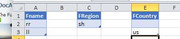
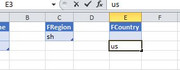
' At this point I have all my filters data in a full string of this type  Fname,rr,ll|FRegion,sh|FCountry,us|Falan,big  so the different filters are seperated by a  |
Rem 4  main loops for all filter bys in all columns
'4a) F___      '                      Looping for each filter ' =======================
Dim arrF__() As String: Let arrF__() = Split(strFtBy, "|", -1, vbBinaryCompare)
Dim F_ As Long
    For F_ = 0 To UBound(arrF__()) '  Looping for each filter by considering every elemnt of a string type array made by splitting  Fname,rr,ll|FRegion,sh|FCountry,us|Falan,big  by  |
    Dim Hdr As String
     Let Hdr = arrF__(F_)
     Let Hdr = Mid(Hdr, 2)  ' This will either be like  Fname,rr,ll  or for no "to be filtered by", it will be the filter column, header , like   Fname    then  in next loop like   FRegion,sh  or  just  FRegion   if the second filter column has not  "to be filtered by"
     Dim Ftd As Long: Let Ftd = 0 '  Set the count of things filterd for the header  to 0   before we go further to see if we have any, so that we can also use it in the final string result if we did not have anything  "to be filtered by"
        If InStr(1, Hdr, ",", vbBinaryCompare) = 0 Then
        ' no things to filter by for this header and Hdr is the final header already
        Else
        Dim arrFby() As String ' array of the header , and to filter bys  for this Header     It must have at least 2 elements at this stage, the header and at least 1  "to be filtered by"
         Let arrFby() = Split(Hdr, ",", -1, vbBinaryCompare)
         Let Hdr = arrFby(0) '  get the filter column header for the case that there is also some  "things to be filtered by"
        '4b)
        Dim MtchRes As Variant
         Let MtchRes = Application.Match(Hdr, Application.Index(arrOut(), 1, 0), 0)   '  Either this will return us an VBA error ( it won't actually error ) ,  or it will give a number of the "position along" of where it makes a match
            If IsError(MtchRes) Then MsgBox prompt:="I can't find " & Hdr & "": Exit Sub ' For the case of getting an VBA error returned I must have an incorrect header somewhere, maybe a typo in a header somewhere
        '4c) This loops as many times as we have  "to be filterd bys"  for a particular filter column
        Dim FbyCnt As Long  ' Looking for each "to be filtered by" in the table +++++++
            For FbyCnt = 1 To UBound(arrFby()) ' Note 1 is the second one, which is the first thing to filter by
             Let Ws2COf = Ws2COf + 1 ' running offset for temporary extra Ws2 output
            'Dim strFtBy As String
             Let strFtBy = arrFby(FbyCnt) ' strFtBy  is now the single value
            Dim Rw As Long ' This loop effectively removes / filters out  lines/rows  by removing the line from the dictionary ,  2 beacuse we don't consider the header row
                For Rw = 2 To UBound(arrOut(), 1) ' -------------------------------------------------------
                    If InStr(1, arrOut(Rw, MtchRes), strFtBy, vbTextCompare) = 0 Then
                    'I have not found a data row in the column with the  "to be filtered by"  text
                    Else
                    Dim strHits As String
                     Let strHits = strHits & arrOut(Rw, MtchRes) & vbCr & vbLf  '  This gives the actual value of a hit, or rather adds it to a long text string for the output, the individual values seperated by  a  line ( vbCr & vbLf)    This can be used conveniantly by spliting by the line to get the  count
                     Dik.Remove Key:=Rw '  I remove this data line from the dictionary
                    End If
                Next Rw ' -------------------------------------------------------------
            '4d)  results info from each  "to be filtered by"
            Debug.Print Dik.Count ' this will be 1 more than the rows we are intersted in ( 1 more because we don't consider the header row )
                 If strHits <> "" Then Let strHits = Left(strHits, Len(strHits) - 2)   ' This takes off the last  vbCr & vbLf  which we don't need
            Dim arrFnd() As String: Let arrFnd() = Split(strHits, vbCr & vbLf, -1, vbBinaryCompare) '  This splits the output string by the  line seperator, and returns a 1 dimansional array where each elemnt is effectively a matched row value.  The number of elements of this array will be a convenient way on the next line to get the numkber of row match results we got
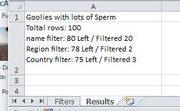
             Let Ws2.Range("C" & NxtRsRw & "").Offset(0, Ws2COf) = "Total rows: " & UBound(arrOut(), 1) - 1 & vbCr & vbLf & "F" & Hdr & " filterd by " & strFtBy & ":" & vbCr & vbLf & (UBound(arrOut(), 1) - 1) - (UBound(arrFnd()) + 1) & " Left / Filtered " & UBound(arrFnd()) + 1 & vbCr & vbLf & strHits  ' ths is a temporary output that gives info for each filter by result
             Let Ftd = Ftd + UBound(arrFnd()) + 1
            '4e) At this point we have done a Filter, reduced the elements in the dictionary, so we must remake the main array again
            Dim arrIn() As Variant
             Let arrIn() = Dik.items() '  Dik.Itams()   returns a 1 dimensional array, and in our case we put a 1 dimensional array in each item, so we have a 1 dimansional array of 1 domansional arrays, and super Alan figured out a way in the next line to turn it into a two dimensional array
             Let arrOut() = Application.Index(arrIn(), Evaluate("Row(1:" & UBound(arrIn()) + 1 & ")"), Evaluate("Column(A:" & Split(Cells(1, ClCnt).Address, "$", -1, vbBinaryCompare)(1) & ")"))
                With Ws3.UsedRange
                 Let .Offset(0, .Columns.Count + 1 + F_).Resize(1, 1) = "Total rows: " & UBound(arrOut(), 1) - 1 & vbCr & vbLf & "F" & Hdr & " filterd by " & strFtBy & ":" & vbCr & vbLf & (UBound(arrOut(), 1) - 1) - (UBound(arrFnd()) + 1) & " Left / Filtered " & UBound(arrFnd()) + 1 & vbCr & vbLf & strHits
                 Let .Offset(5, .Columns.Count + 1).Resize(UBound(arrOut(), 1), 4) = arrOut()
                End With
             Let strHits = ""
            ' At this point we made a new array from the dictionary items remaining.  The key, pseudo the index will be fucked up, example,  6  items left might have keys   1 3 4 6 8 9  but they are in order ( I hope )
             Set Dik = Nothing: Set Dik = CreateObject("Scripting.Dictionary")
                For DikCnt = 1 To UBound(arrOut(), 1) '   This  is necersary to get the  array  row number and the dictionary key  in wach
            '    Dim Ex As Variant
            '     Let Ex = Dick(Haray(Cnt))
                Dik.Add Key:=DikCnt, Item:=Application.Index(arrOut(), DikCnt, 0) ' Each item in the dictionary is a 1 dimensional array of a single row of the data range
                Next DikCnt
            Dim strFbys As String
             Let strFbys = strFbys & strFtBy & " " '  this gives us a string like for example if there were two "to be filtered by things"  rr  and  ll   then the string will finally be   rr ll
            Next FbyCnt '  ' Looking for each "to be filtered by" in the table ++++++++
        Dim strRes As String
'         Let strRes = strRes & Hdr & " filter: " & Dik.Count - 1 & " Left / Filtered " & Ftd & vbCr & vbLf

        End If
     Let strRes = strRes & Hdr & " filter " & strFbys & ": " & Dik.Count - 1 & " Left / Filtered " & Ftd & vbCr & vbLf  '  This is the main wanted output  - total for each filter     The  Dik.Count  at this point will be from the last made which will be what left after we went through all the  "to be filtered by"    The  Ftd  was a running total  for the  filter header   and the   strFbys  a string with all the "things to be filtered by" seperated by a space
     Let strFbys = ""
    Next F_  ' ==== looping for each filter ===========================================

Rem 5  Main output results
Debug.Print strRes
 Let Ws2.Range("C" & NxtRsRw & "") = strRes
 Ws2.Columns.AutoFit
 Ws2.Activate
 Ws2.Range("C" & NxtRsRw & "").Select
 Ws3.Columns.AutoFit
End Sub


 Reply With Quote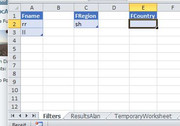

Bookmarks