Page 20 of 21 FirstFirst ... 1018192021 LastLast
Results 191 to 200 of 202

Thread: Appendix Thread 2. ( Codes for other Threads, HTML Tables, etc.)

  1. #191
    Fuhrer, Vierte Reich DocAElstein's Avatar
    Join Date
    Aug 2014
    Posts
    10,542
    Rep Power
    10
    Some notes in support of this Forum Question
    https://eileenslounge.com/viewtopic.php?f=27&t=34116

    Question from the web:
    Question
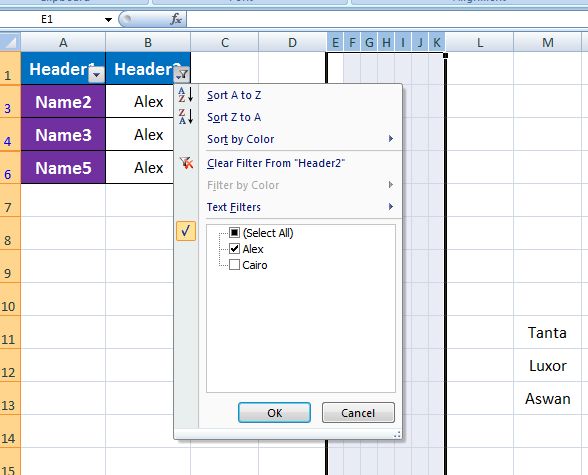
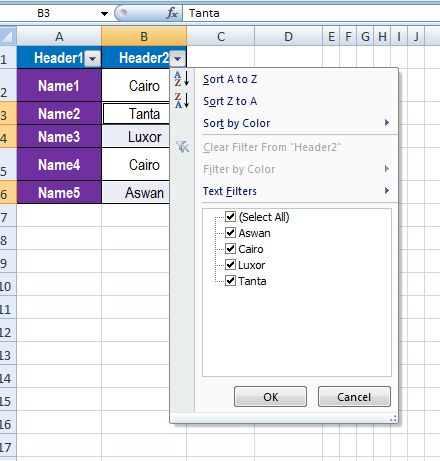
    I have range A1:B6 with headers and I have filtered on column B with specific text and this results in three results B3 / B4 / B6
    And in another range M11:M13 I have three different values (Tanta, Luxor, Aswan)


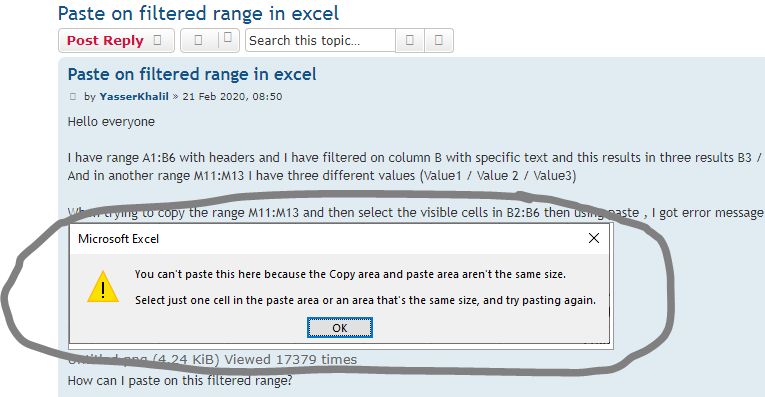
    When trying to copy the range M11:M13 and then select the visible cells in B2:B6 then using paste , I got error message


    _.________

    Typical Answer
    Excel cannot do this. If you want to paste a contiguous range into the visible cells of another range, you have to do it cell by cell.


    _.______

    Hmm…
    This was one working solution from me
    Code:
    Option Explicit
    Sub PasteIntoFilturdRange() ' http://www.eileenslounge.com/viewtopic.php?f=27&t=34116&p=264507#p264507
    Range("B3:B6").SpecialCells(xlCellTypeVisible).Copy
    Paste Destination:=Range("L11")
    Range("K10:K13").Value = "=IF(ISERROR(VLOOKUP(B3,L11:M$13,2,FALSE)),B3,VLOOKUP(B3,L11:M$13,2,FALSE))"
    Range("K10:K13").Copy
    Range("B3:B6").PasteSpecial Paste:=xlPasteValues
    End Sub
    (Note that it is important to have no $ on the L in range L11:M$13. This is because we want to get the next Alex, not always the same first one)
    Attached Files Attached Files
    Last edited by DocAElstein; 08-29-2025 at 05:10 PM.

  2. #192
    Fuhrer, Vierte Reich DocAElstein's Avatar
    Join Date
    Aug 2014
    Posts
    10,542
    Rep Power
    10
    _......a quick test, Following on from the last post
    We have an add-in offering from new member , Andreas Killer ,
    https://www.excelfox.com/forum/showt...5160#post25160


    Testing in Excel 2007
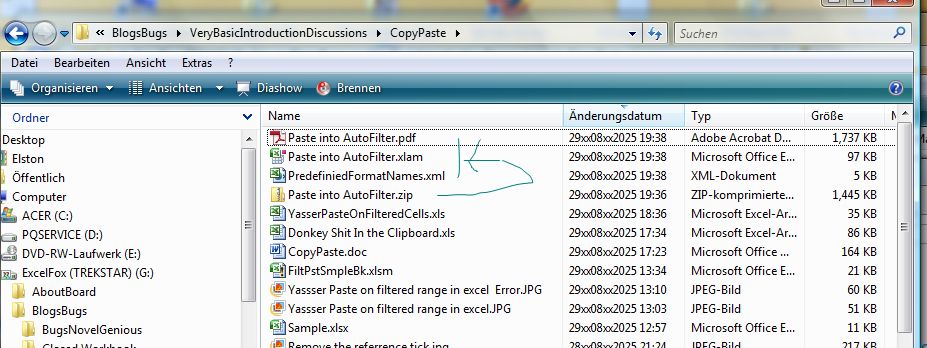
    I downloaded the .zip file, Paste into AutoFilter.zip , somewhere arbitrary, and copied the contents from that .zip folder into the same place. ( Just my way of "unzipping" things ).
    https://i.postimg.cc/gcxz4HzF/Downla...Excel-2007.jpg


    I simply opened Paste into AutoFilter.xlam, and there was the promised bit in the ribbon
    https://i.postimg.cc/NGZgn2Fy/The-bit-in-Excel-2007.jpg


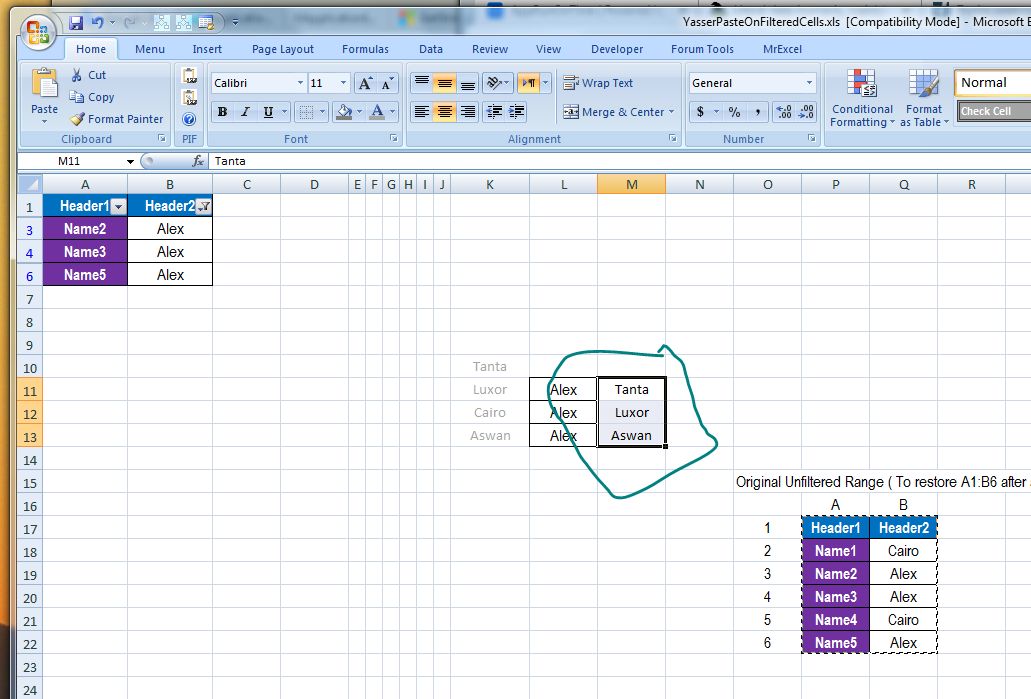
    I select and copy the bit I want to paste into a filtered range
    https://i.postimg.cc/SRBtGhys/Copy-a...ered-range.jpg


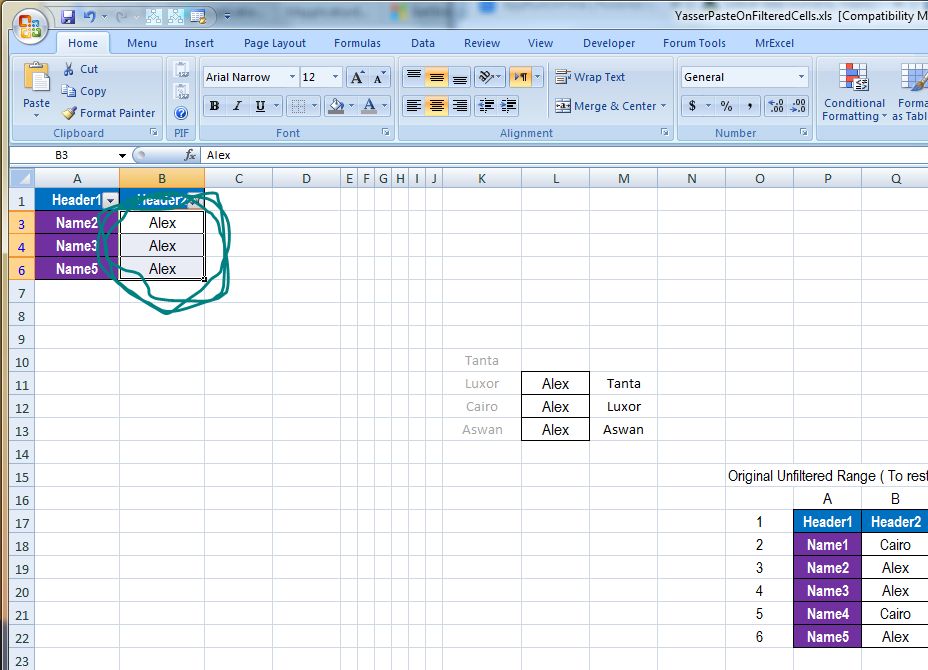
    I select the filtered range
    https://i.postimg.cc/BbLVD6fk/Select...ered-range.jpg


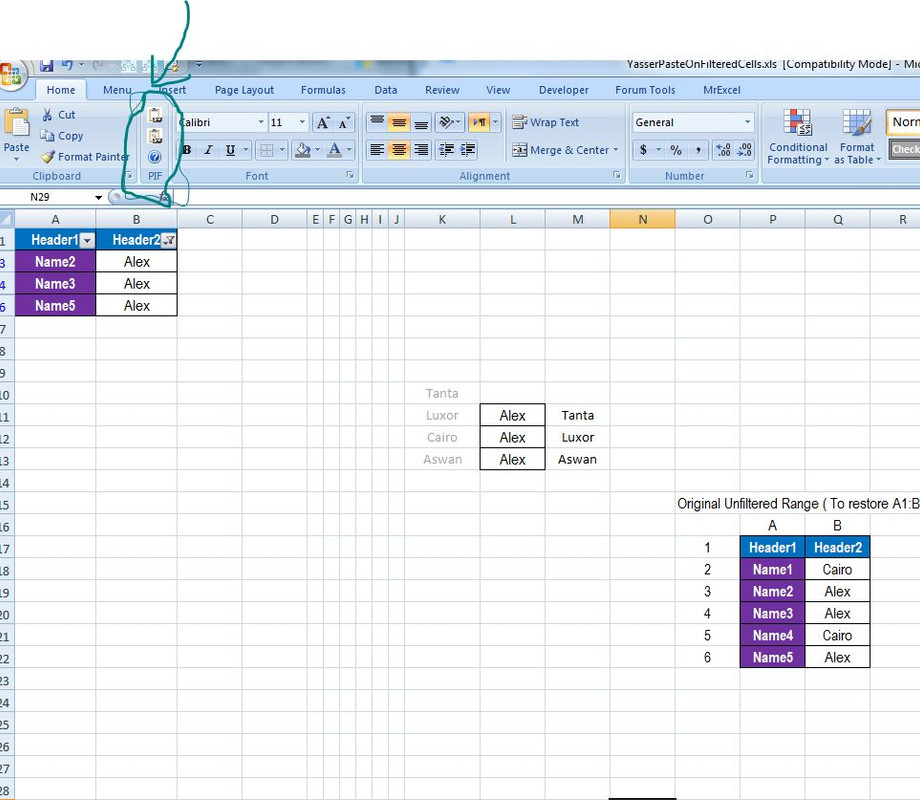
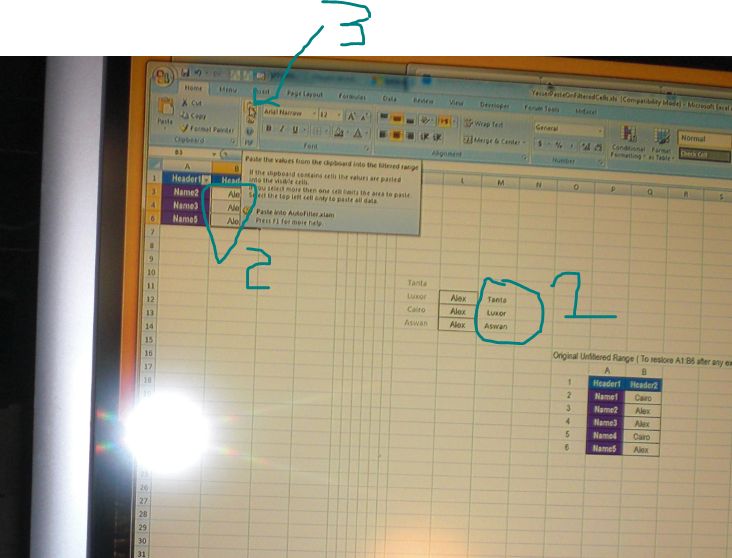
    Then I select the first icon thingy from Andreas , ( step 3 in the next screenshot )
    https://i.postimg.cc/q7wSHSGb/select...eas-step-3.jpg


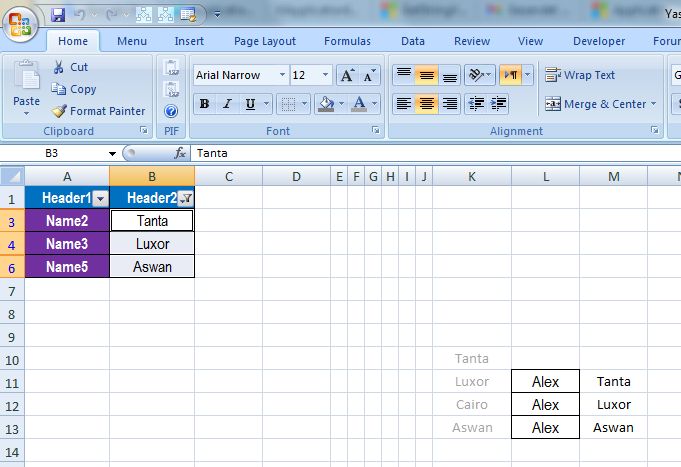
    Bingo!
    https://i.postimg.cc/1tYdfF2D/Bingo.jpg


    Just to check, I took a look at the unfiltered range, and the results are as expected
    https://i.postimg.cc/XJvhjLHV/Just-t...no-filter.jpg]


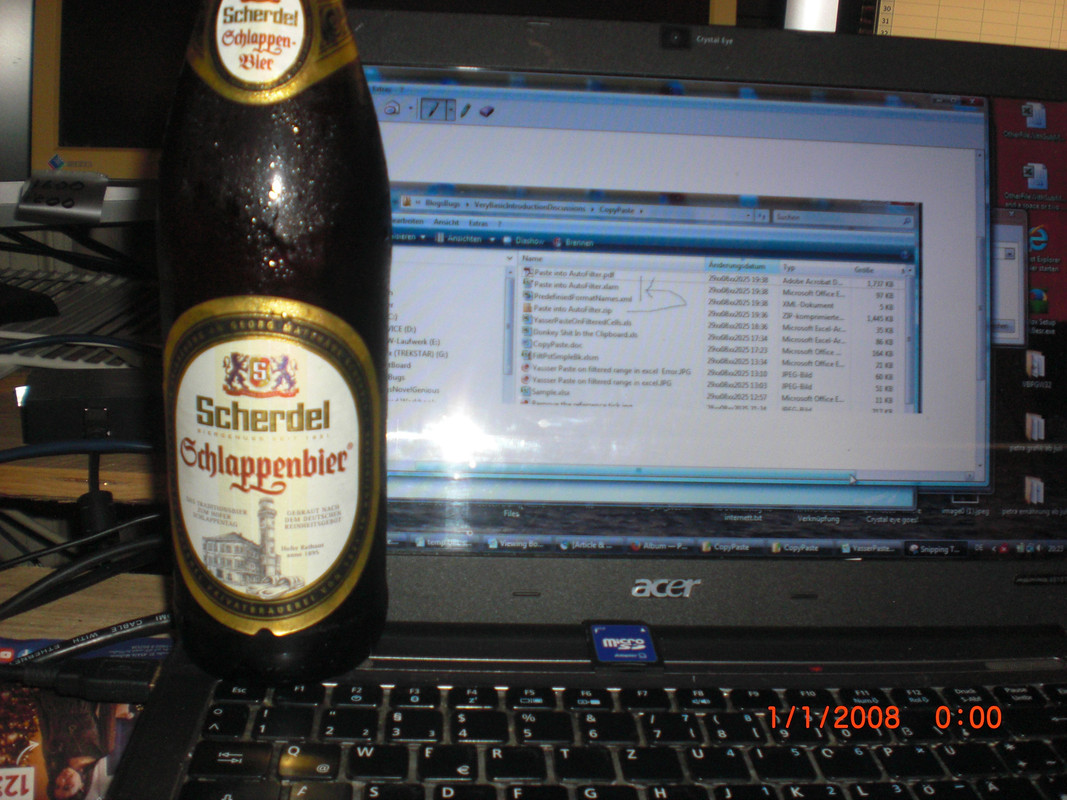
    I did that on the 4th SchlappenBier on a Friday night , so any sane and sober person should be able to do it


    On Excel 2010 and above I have had no joy yet. Probably as Microsoft fucked everything up from sometme around 2010 onwards.

    I have to be "off air" for a few days, I will take a look later, next week, or wait until Andreas has done a few more posts. …
    Attached Files Attached Files
    ….If you are my competitor, I will try all I can to beat you. But if I do, I will not belittle you. I will Salute you, because without you, I am nothing.
    If you are my enemy, we will try to kick the fucking shit out of you…..
    Winston Churchill, 1939
    Save your Forum..._
    KILL A FORUM MODERATOR!!

  3. #193

  4. #194
    Fuhrer, Vierte Reich DocAElstein's Avatar
    Join Date
    Aug 2014
    Posts
    10,542
    Rep Power
    10
    Later

  5. #195
    Fuhrer, Vierte Reich DocAElstein's Avatar
    Join Date
    Aug 2014
    Posts
    10,542
    Rep Power
    10
    later

  6. #196
    Fuhrer, Vierte Reich DocAElstein's Avatar
    Join Date
    Aug 2014
    Posts
    10,542
    Rep Power
    10
    Rem X the short cut
    _.... form last post
    Quote Originally Posted by DocAElstein View Post

    The short cut
    After running , this section, sections might want to be ' commented out. On the other hand, I am plagued by my short cuts vanishing in Word versions above 2010, and I don't think setting them when they are already there, set, does any harm.

    As often the lack of concise documentation or any easily findable help, or knowledge meant some basic trial and error research was necessary to get near a good understanding here. I have not investigated this thoroughly yet, but the following statements my be close.
    These sorts of statements may be fairly reliable to set a shortcut to a macro in the Normal dot

    , and as may be good practice, the code lines to remove the short cut are also included
    Code:
     CustomizationContext = NormalTemplate '
     '                         Example: Hold the Ctrl+Shift key down and hit H key  ,  remove all fingers, then hit  L  Key             ( Ctrl + Shift ) + H  ;  L
     '  https://eileenslounge.com/viewtopic.php?p=332884#p332884                                                              CTRL  512    SHIFT 256    H 72              L 76
     KeyBindings.Add KeyCategory:=wdKeyCategoryCommand, Command:="Normal.NewMacros.TestHelloInNormal", KeyCode:=BuildKeyCode(wdKeyControl, wdKeyShift, wdKeyH), KeyCode2:=wdKeyL
     KeyBindings.Add KeyCategory:=wdKeyCategoryCommand, Command:="Normal.NewMacros.TestHelloInNormal", KeyCode:=512 + 256 + 72, KeyCode2:=76
    
     CustomizationContext = NormalTemplate
     FindKey(KeyCode:=512 + 256 + 72, KeyCode2:=76).Disable
    
    That would be the shortcut key combination of
    _ Holding the two keys, Ctrl+Shift down and hit H key , then remove all fingers and then hit L Key
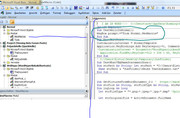
    This example would assume that you have a macro in the NewMacros module in the Normal dot called Sub TestHelloInNormal() , as I do
    https://i.postimg.cc/hG5nGRVX/A-macro-in-Normal-dot.jpg
    A macro in Normal dot.jpg
    This is reasonably OK and solid, at least if you go not much further than sort cuts for your Normal dot .
    Things can be a bit more involved, especially if you want to consider short cuts specific to a workbook.
    I think for now, I will therefore break off o a new post here

    _.......... next post


    OK, so short cuts related to Normal dot , are, ( at least for Word 2010 and lower ), mostly in the bag, as far as I can tell.
    But we have another useful option, (that they may not have quite got sorted, as they may have been drinking the wrong Beer)

    We can assign short cuts that are linked to a specific document.
    We can even use the same Shortcut combination, which is quite amazing, with the dependency chains written to avoid conflicts. But as they did not quite get that far, we need to tread carefully and note some "features"

    This is fairly robust in setting, or deleting
    Last edited by DocAElstein; Today at 11:40 PM.

  7. #197
    Fuhrer, Vierte Reich DocAElstein's Avatar
    Join Date
    Aug 2014
    Posts
    10,542
    Rep Power
    10
    Rem X the short cut
    _.... form last post
    Quote Originally Posted by DocAElstein View Post

    The short cut
    After running , this section, sections might want to be ' commented out. On the other hand, I am plagued by my short cuts vanishing in Word versions above 2010, and I don't think setting them when they are already there, set, does any harm.

    As often the lack of concise documentation or any easily findable help, or knowledge meant some basic trial and error research was necessary to get near a good understanding here. I have not investigated this thoroughly yet, but the following statements my be close.
    These sorts of statements may be fairly reliable to set a shortcut to a macro in the Normal dot

    , and as may be good practice, the code lines to remove the short cut are also included
    Code:
     CustomizationContext = NormalTemplate '
     '                         Example: Hold the Ctrl+Shift key down and hit H key  ,  remove all fingers, then hit  L  Key             ( Ctrl + Shift ) + H  ;  L
     '  https://eileenslounge.com/viewtopic.php?p=332884#p332884                                                              CTRL  512    SHIFT 256    H 72              L 76
     KeyBindings.Add KeyCategory:=wdKeyCategoryCommand, Command:="Normal.NewMacros.TestHelloInNormal", KeyCode:=BuildKeyCode(wdKeyControl, wdKeyShift, wdKeyH), KeyCode2:=wdKeyL
     KeyBindings.Add KeyCategory:=wdKeyCategoryCommand, Command:="Normal.NewMacros.TestHelloInNormal", KeyCode:=512 + 256 + 72, KeyCode2:=76
    
     CustomizationContext = NormalTemplate
     FindKey(KeyCode:=512 + 256 + 72, KeyCode2:=76).Disable
    
    That would be the shortcut key combination of
    _ Holding the two keys, Ctrl+Shift down and hit H key , then remove all fingers and then hit L Key
    This example would assume that you have a macro in the NewMacros module in the Normal dot called Sub TestHelloInNormal() , as I do
    https://i.postimg.cc/hG5nGRVX/A-macro-in-Normal-dot.jpg
    A macro in Normal dot.jpg
    This is reasonably OK and solid, at least if you go not much further than sort cuts for your Normal dot .
    Things can be a bit more involved, especially if you want to consider short cuts specific to a workbook.
    I think for now, I will therefore break off o a new post here

    _.......... next post
    Last edited by DocAElstein; Yesterday at 11:28 PM.

  8. #198
    Fuhrer, Vierte Reich DocAElstein's Avatar
    Join Date
    Aug 2014
    Posts
    10,542
    Rep Power
    10
    later lll

  9. #199
    Fuhrer, Vierte Reich DocAElstein's Avatar
    Join Date
    Aug 2014
    Posts
    10,542
    Rep Power
    10
    Coding for this main forum thread
    https://eileenslounge.com/viewtopic....332971#p332971
    https://eileenslounge.com/viewtopic....332949#p332949


    ( https://pastebin.com/RJKZF9WU )


    Code:
    Option Explicit
    Sub M_snb_hyperlink1() '  https://eileenslounge.com/viewtopic.php?p=332949#p332949    https://pastebin.com/RJKZF9WU
    On Error GoTo Bed:
    1 Application.CommandBars("hyperlink Context Menu").Controls("Open Hyperlink").Execute
    2 Application.CommandBars("hyperlink Context Menu").Controls(10).Execute
    Exit Sub
    Bed:
    Debug.Print Erl & "   " & Err.Number & " " & Err.Description ' Line number of error     Error number Error description
    Resume Next
    End Sub
    Sub M_snb_hyperlink2()
    On Error GoTo Bed:
    3 Application.CommandBars.ExecuteMso "HyperlinkOpen"
    Exit Sub
    Bed:
    Debug.Print Erl & "   " & Err.Number & " " & Err.Description ' Line number of error     Error number Error description
    Resume Next
    End Sub


    Only


    ' 2003
    ' 1   5 Invalid procedure call or argument
    ' 2   Often no error but nothing happens.   Sometimes  -2147467259 The 'Execute' method of the '_CommandBarButton' object failed.
    
    ' 2007  German
    ' 1   always error    5 Invalid procedure call or argument                    2147024809 The index refers to values ??beyond the end of the list.
    ' 2   Mostly does not error, and mostly does not do anything, but occaisionally does  MsgBox Error  ___________could not be opened. The Internet server or proxy could not be found     https://i.postimg.cc/rmPGyqph/could not be opened The Internet server or proxy could not be found.jpg
    
    ' 3   Mostly does not error, and mostly does not do anything, but occaisionally does  MsgBox Error   __________The Internet server or proxy could not be found.   https://i.postimg.cc/kGgWnxTQ/could not be opened.  The Internet server or proxy could not be found.jpg
    
    ' 2007  English (Kl)
    ' 1   Often works   ( Not on Eileen )   https://i.postimg.cc/RZDGf9Cg/Eileen-link-error-line-1-Word-2007-Kl.jpg
    ' 2   Does nothing, also no error
    ' 3   Mostly works  ( Not on Eileen )
    
    ' 2010  German
    ' 1 always error      5 Invalid procedure call or argument
    
    ' 2    no error, and some links work, some do not and we get the pop up  _____ could not be opened. The requested information cannot be downloaded    https://i.postimg.cc/nL92G5MS/Eileen-link-error-line-2-Word-2010-Kl.jpg
    ' 3    no error, and some links work, some do not and we get the pop up  _____ could not be opened. The requested information cannot be downloaded


    Sub CommanBars()
    Dim Cbar As CommandBar
        For Each Cbar In Application.CommandBars
         Debug.Print Cbar.Index, Cbar.Name, Cbar.NameLocal, Cbar.Visible  ' 148          Hyperlink Context Menu      Hyperlink-Kontextmenü       Falsch
        Next Cbar
    'Dim CbarHypE As Object, CbarHypG As Object
    ' Set CbarHypE = Application.CommandBars("hyperlink Context Menu") ': Set CbarHypG = Application.CommandBars("Hyperlink-Kontextmenü")
    'Debug.Print Application.CommandBars("hyperlink Context Menu").FindControl(msoControlButton, 22).Caption
    Debug.Print
    End Sub
    
    
    Sub CommandBarName() '
    10 Debug.Print Application.CommandBars("hyperlink Context Menu").NameLocal '
    On Error GoTo Bed
    Dim CbarHypE As Object, CbarHypG As Object
    20 Set CbarHypE = Application.CommandBars("hyperlink Context Menu")
    30 Set CbarHypG = Application.CommandBars("Hyperlink-Kontextmenü")  '   2007 German  5 Invalid procedure call or argument
    Exit Sub
    Bed:
    Debug.Print Erl & "   " & Err.Number & " " & Err.Description ' Line number of error     Error number Error description
    Resume Next
    End Sub
    
    
    'Print Application.CommandBars("hyperlink Context Menu").NameLocal
    'Hyperlink -Kontextmenü


    '
    
    ….If you are my competitor, I will try all I can to beat you. But if I do, I will not belittle you. I will Salute you, because without you, I am nothing.
    If you are my enemy, we will try to kick the fucking shit out of you…..
    Winston Churchill, 1939
    Save your Forum..._
    KILL A FORUM MODERATOR!!

  10. #200
    Fuhrer, Vierte Reich DocAElstein's Avatar
    Join Date
    Aug 2014
    Posts
    10,542
    Rep Power
    10
    later
    Last edited by DocAElstein; 05-20-2026 at 05:03 PM.

Similar Threads

  1. VBA to Reply All To Latest Email Thread
    By pkearney10 in forum Outlook Help
    Replies: 11
    Last Post: 12-22-2020, 11:15 PM
  2. Appendix Thread. Diet Protokol Coding Adaptions
    By DocAElstein in forum Test Area
    Replies: 6
    Last Post: 09-05-2019, 10:45 AM
  3. Replies: 19
    Last Post: 04-20-2019, 02:38 PM
  4. Search List of my codes
    By PcMax in forum Excel Help
    Replies: 6
    Last Post: 08-03-2014, 08:38 AM

Posting Permissions

  • You may not post new threads
  • You may not post replies
  • You may not post attachments
  • You may not edit your posts
  •