


Spare post for later use
Posts number: 15631 ( I copied this post from the original post #6 which is post number 10422 )
Links to here :
https://excelfox.com/forum/showthrea...ll=1#post15631
https://excelfox.com/forum/showthread.php/1324-Loop-Through-Files-In-A-Folder-Using-VBA?p=15629&viewfull=1#post15631
https://excelfox.com/forum/showthrea...-VBA#post15631
https://excelfox.com/forum/showthread.php/1324-Loop-Through-Files-In-A-Folder-Using-VBA#post15631
Some extra notes.
These notes are for the following reasons …
_ In support of possible further answers to this Thread: https://excelfox.com/forum/showthrea...ll-Sub-Folders ( https://excelfox.com/forum/showthrea...5616#post15616 )
_ a working example to revise / refresh and simplified summarise some of my notes above:
Working example to demonstrate and summarise what I was talking about in the last few posts above
This is what you do..
I download the zip file, EileensFldr.zip , which has some folders and sub folders and files to demo the coding on. I also downloaded the file, wbCodes.xlsm , with a lot of macros in it including the various codings being discussed, ( see _1b in next pic) , . - I chose some arbitrary place and made a note of it: F:\Excel0202015Jan2016\ExcelFox\Word\prkhan56 ( see _1 in next pic )
I need to “unzip” the zip file, ( we “zip things” just to make it easier to store and post . “zipping” does some sort of efficient condensing which makes it easier to store and transport big things. They need to then be “unzipped” to get them back in their normal original form )
To unzip I _1) double click in the explorer window on EileensFldr.zip to get inside it _2)
Inside it I have what I want, the folder EileensFldr. In my Computers with window systems from Operating system Vista, ( Vista, Windows 7, Windows 10 ) , the “unzipping” seems to happen automatically when I copy and paste what’s in the zip folder. So I copy it, and paste it, _3)
( for convenience I paste it back in the same folder containing the zip folder. Download and unzip _1 _2 _3 .jpg
Attachment 3619
In the downloaded file, wbCodes.xlsm , I add a new worksheet, and kept that as the active sheet ( active sheet = the one showing, the one you are looking at ).
I go into the VB Editor ( via Alt+F11 , for example ) and look for one of the recursion codings.
I chose Sub VBADoStuffInFoldersInFolderRecursion() 'Main routine to "Call" the first copy of the second routine, VBALoopThroughEachFolderAndItsFile(
Sub VBADoStuffInFoldersInFolderRecursion().JPG
Attachment 3620
I made a few changes , so as to make sure the correct sample files were to be used and that the results appeared on my active sheet
Code:' Dec 2017 For Python Comparison. Tutorial Post: excelforum: https://www.excelforum.com/tips-and-tutorials/1213798-all-sub-folder-and-file-list-from-vba-recursion-routine-explanation-and-method-comparison.html Tutorial Post: ExcelFox: http://www.excelfox.com/forum/showthread.php/1324-Loop-Through-Files-In-A-Folder-Using-VBA?p=10420#post10420 'http://excelpoweruser.blogspot.de/2012/04/looping-through-folders-and-files-in.html http://www.excelforum.com/excel-programming-vba-macros/1126751-get-value-function-loop-through-all-files-in-folder-and-its-subfolders.html#post4316662 http://www.excelfox.com/forum/f5/loop-through-files-in-a-folder-using-vba-1324/ Sub VBADoStuffInFoldersInFolderRecursion() 'Main routine to "Call" the first copy of the second routine, VBALoopThroughEachFolderAndItsFile( Rem 1A) Some Worksheets and General Variables Info Dim Ws As Worksheet '_-Dim: Prepares "Pointer" to a "Blue Print" (or Form, Questionaire not yet filled in, a template etc.)"Pigeon Hole" in Memory, sufficient in construction to house a piece of Paper with code text giving the relevant information for the particular Variable Type. VBA is sent to it when it passes it. In a Routine it may be given a particular “Value”, or (“Values” for Objects). There instructions say then how to do that and handle(store) that(those). At Dim the created Paper is like a Blue Print that has some empty spaces not yet filled in. A String is a a bit tricky. The Blue Print code line Paper in the Pigeon Hole will allow to note the string Length and an Initial start memory Location. This Location well have to change frequently as strings of different length are assigned. Instructiions will tell how to do this. Theoretically a specilal value vbNullString is set to aid in quich checks.. But..http://www.mrexcel.com/forum/excel-questions/361246-vbnullstring-2.html#post4411 ' Set Ws = ThisWorkbook.Worksheets.Item(1) 'Worksheets("EFFldr") 'CHANGE TO SUIT YOUR WORKSHEET '_- Set: Fill or partially Fill: Setting to a Class will involve the use of an extra New at this code line. I will then have an Object referred to as an instance of a Class. At this point I include information on my Pointer Pigeon hole for a distinct distinguishable usage of an Object of the Class. For the case of something such as a Workbook this instancing has already been done, and in addition some values are filled in specific memory locations which are also held as part of the information in the Pigeon Hole Pointer. We will have a different Pointer for each instance. In most excel versions we already have a few instances of Worksheets. Such instances Objects can be further used., - For this a Dim to the class will be necessary, but the New must be omitted at Set. I can assign as many variables that I wish to the same existing instance Set Ws = ActiveSheet Ws.Range("B3:F30").ClearContents ' This line only needed for demo code Dim celTL As Range: Set celTL = Ws.Range("B3") 'Top left of where Listing should go Rem 2A) Get Folder Info Dim strWB As String ' "Pointer" to a "Blue Print" (or Form, Questionaire not yet filled in, a template etc.)"Pigeon Hole" in Memory, sufficient in construction to house a piece of Paper with code text giving the relevant information for the particular Variable Type. VBA is sent to it when it passes it. In a Routine it may be given a particular “Value”, or (“Values” for Objects). There instructions say then how to do that and handle(store) that(those). At Dim the created Paper is like a Blue Print that has some empty spaces not yet filled in. A String is a a bit tricky. The Blue Print code line Paper in the Pigeon Hole will allow to note the string Length and an Initial start memory Location. This Location well have to change frequently as strings of different length are assigned. Instructiions will tell how to do this. Theoretically a specilal value vbNullString is set to aid in quich checks.. But..http://www.mrexcel.com/forum/excel-questions/361246-vbnullstring-2.html#post44116 ' Let strWB = ThisWorkbook.Path & "\" & "EileensFldr" ' 'CHANGE TO SUIT if you store the main Folder to be looked through somewhere other than in the same Folder as this workbook in which the codes are in Let strWB = "F:\Excel0202015Jan2016\ExcelFox\Word\prkhan56\EileensFldr" Rem 3A ) ' FileSystemObject Object
That’s it!
Run the macro, Sub VBADoStuffInFoldersInFolderRecursion() 'Main routine to "Call" the first copy of the second routine, VBALoopThroughEachFolderAndItsFile( ( make sure you have the new made sheet active )
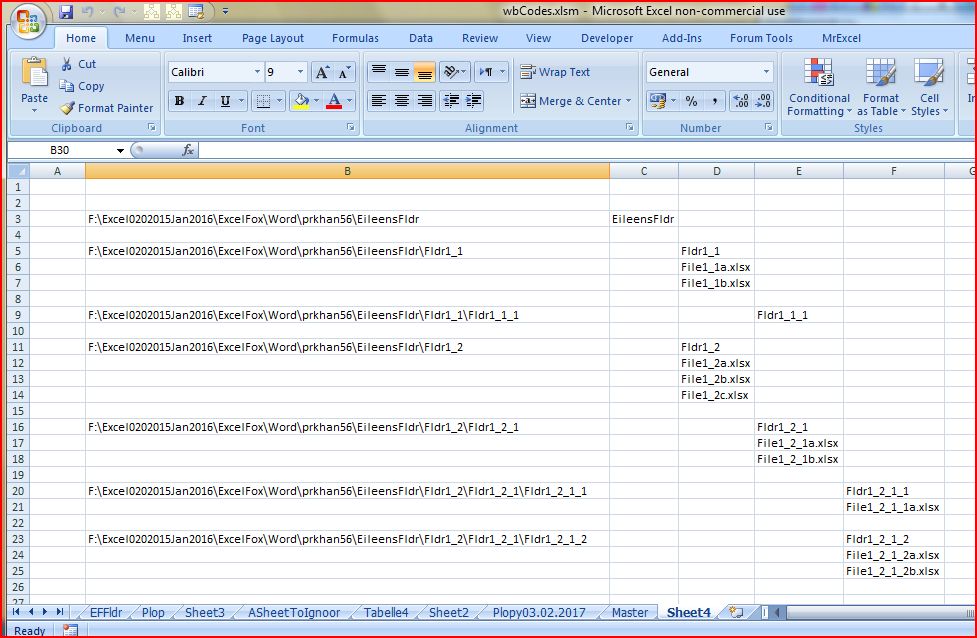
The results match those given in the previous posts: Example results.jpg
Another example
Just a practical example. .. I am curious to see if some files containing information about my drivers on a computer change when I install a simple HP Printer, ( HP 1050 ). ……._ Continued in next page #2.


 Reply With Quote
Bookmarks